In-app support tools are customer help systems built directly into your product, so users never leave the app to get answers. Startups that embed support inside their product resolve issues faster, retain more users, and collect better feedback than teams relying on external email queues or help center redirects. The importance of in-app support comes down to one measurable fact: friction kills retention. When users hit a wall and have to open a new tab, write an email, or search a knowledge base, most of them simply leave. The industry term for this embedded approach is "product-led support," and it is quickly becoming the default standard for SaaS teams that want to grow without proportionally growing their support headcount.
Why startups need in-app support tools to reduce churn
Churn is the single most dangerous metric for an early-stage startup. Losing users faster than you acquire them means no amount of marketing spend fixes the underlying problem. In-app support tools attack churn at its root by removing the friction that causes users to give up quietly.

Loom is the clearest proof point available. By embedding AI-powered in-app support, Loom resolved 80% of help requests without any human escalation, cutting churn by 11%. That same deployment produced a 10.7% increase in product usage. Those two numbers together tell a complete story: fewer frustrated users leaving, and more engaged users staying.
The mechanism behind this result is context. When a user hits a bug or gets confused, they are already inside your product. An in-app widget can read their current state, their recent actions, and the exact screen they are on. That context lets the support response be specific rather than generic. Generic answers frustrate users. Specific answers resolve problems.
"Support should be treated as a key retention lever, not a backend function. Seamless in-app access increases user engagement in ways that external support channels simply cannot replicate."
The data reinforces this point. 89% of users say they would seek help more often if support access were seamless within the app. The inverse is equally true: forcing users outside the app to get help is a direct driver of silent churn.
- Users who get help inside the app are more likely to complete their task and return.
- Users who must leave the app to find answers often do not come back.
- Proactive in-app prompts catch confusion before it becomes a support ticket.
- Real-time issue resolution keeps users in the flow state that drives product adoption.
Pro Tip: Set up contextual triggers that fire a help prompt when a user stalls on a specific screen for more than 30 seconds. This proactive approach catches frustration before the user decides to leave.
How does AI scale in-app support for a small startup team?
Most startup support teams are one or two people handling everything. AI changes that math dramatically. AI agents are projected to handle 95% of customer interactions autonomously, reducing support costs by 60–80%. Gartner forecasts that AI will manage 30% of enterprise customer interfaces by 2027. For a startup, that means a two-person team can realistically support thousands of active users without hiring.
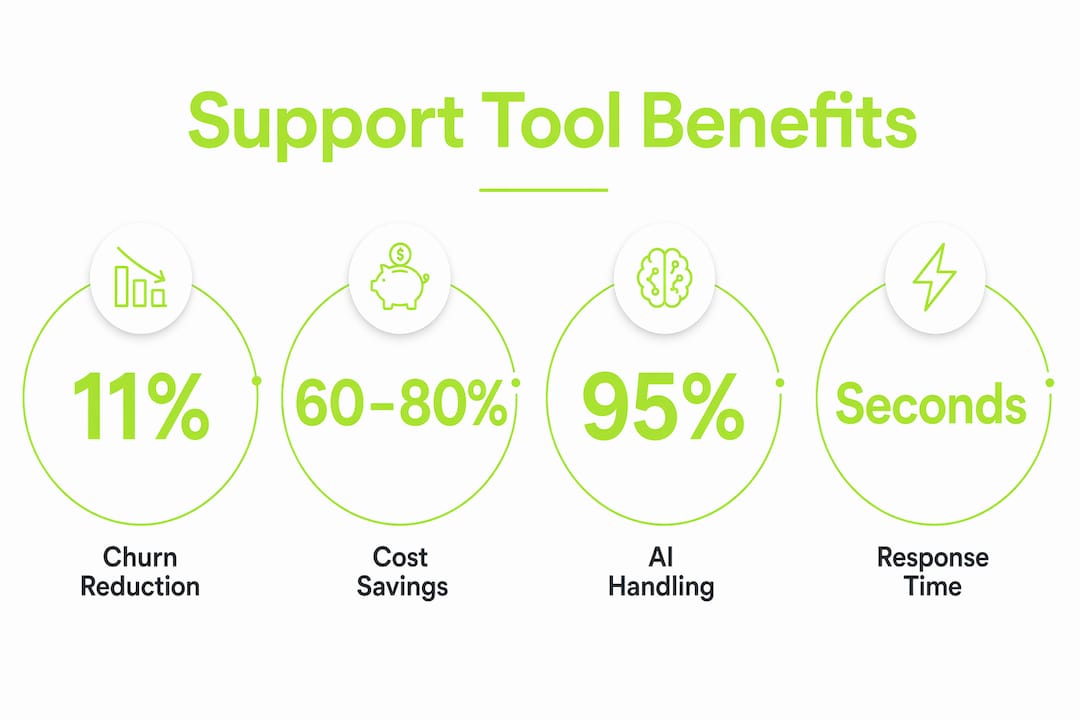
The key distinction is between AI that reads documentation and AI that reads context. Static FAQ bots pull from a knowledge base and often return irrelevant answers. Context-aware AI support reads the user's current state, recent activity, and session history to generate answers that actually match the problem. Sentiment improves measurably when AI understands the specific situation rather than serving a generic response.
| Support approach | Response time | Context awareness | Human escalation |
|---|---|---|---|
| External email support | Hours to days | None | Manual, no session data |
| Static FAQ bot | Seconds | None | Disconnected handoff |
| Context-aware in-app AI | Seconds | Full session history | Handoff with full context |
AI bots handle routine queries while escalating with full context to human agents when needed. That handoff quality matters enormously. When a human agent receives a ticket that already includes session replays, recent actions, and the exact error state, they resolve it in one exchange instead of three.
Pro Tip: Configure your AI to handle the top 10 most common support questions first. Track deflection rates weekly and expand the AI's scope only after those 10 are performing well. Incremental rollout prevents gaps in coverage.
What features should startups look for in in-app support tools?
Not every in-app support tool delivers the same value. The features that separate effective tools from expensive noise are specific and measurable.
Live chat with context awareness is the foundation. In-app live chat delivers responses in seconds, compared to hours or days for email. Speed matters, but context matters more. A chat widget that knows which page the user is on and what they just did resolves issues in one message instead of five.
Integrated ticketing keeps every issue in one place. When a user reports a bug, the ticket should automatically attach session data, browser information, and reproduction steps. Without this, support agents spend the first half of every conversation asking for information the system should already have.
The following features define a complete in-app support setup for a startup:
- Feedback collection widget: Captures user-reported issues with screenshots and session context attached automatically.
- Session replay: Lets support agents watch exactly what the user experienced, eliminating ambiguous bug reports.
- AI-generated reproduction steps: Converts session data into a structured bug report that engineers can act on immediately.
- Self-service knowledge base: Handles the most common questions without any agent involvement.
- Proactive notifications: Triggers help prompts based on user behavior, not just user requests.
- Human escalation with full context: Passes complete session history to a human agent when AI cannot resolve the issue.
Coevy delivers all of these features in a single embedded widget. Its AI reads actual source code rather than documentation, which means its answers are tied to how the product actually works rather than how it was described in a help article. The platform is also GDPR-compliant, with field masking and IP anonymization built in.
Pro Tip: Prioritize tools that attach session data to every ticket automatically. Manual bug reporting wastes engineering time and produces incomplete information. Automatic context capture cuts resolution time significantly.
How to implement in-app support tools at your startup
Implementation fails most often when teams treat it as a one-time setup rather than an ongoing process. The following steps reflect how successful SaaS teams actually deploy and refine in-app support.
Start with a single widget placement. Put the support widget on the screen where users most commonly get stuck. Use product analytics to identify that screen before you build anything. Starting everywhere at once produces noisy data and unclear results.
Configure AI for your top support categories. Pull your last 90 days of support tickets and identify the five most common question types. Build AI responses for those five categories first. AI-first support works best when it starts narrow and expands based on real usage data.
Set up automatic context capture. Every support interaction should automatically log the user's current page, recent actions, browser version, and any error messages. This eliminates the back-and-forth that makes support slow and frustrating for both sides.
Define your escalation threshold. Decide in advance which issue types go directly to a human agent. Complex billing disputes, data loss reports, and security concerns should never be handled by AI alone. Balancing automation with human support is what separates good support from bad support.
Use support data to improve the product. Every support ticket is a signal about where your product fails users. Review ticket categories monthly and share the top friction points with your product team. Support data is one of the most underused sources of product insight available to early-stage founders.
Measure deflection rate, not just ticket volume. Deflection rate tells you what percentage of issues AI resolved without human involvement. A rising deflection rate means your AI is improving. A flat or falling rate means your AI needs more training data or better configuration.
Pro Tip: Run a monthly support audit with your product manager. Map the top five ticket categories to specific product screens. If the same screen generates 30% of your tickets, that screen needs a UX fix, not just better support copy.
Key Takeaways
In-app support tools are the most direct way for startups to reduce churn, cut support costs, and turn user frustration into product insight, all without scaling headcount.
| Point | Details |
|---|---|
| Churn reduction is measurable | Loom cut churn by 11% after embedding AI-powered in-app support across its product. |
| AI handles the volume | Context-aware AI resolves up to 95% of interactions, freeing human agents for complex issues. |
| Context is everything | Support tools that read session state produce faster, more accurate resolutions than static FAQ bots. |
| Features drive outcomes | Session replay, auto-tagging, and automatic context capture cut resolution time and improve ticket quality. |
| Data improves the product | Monthly review of support ticket categories reveals friction points that product teams can fix at the source. |
The case for treating support as a product feature
Most founders I talk to treat support as a cost center. They staff it reactively, measure it by ticket volume, and consider it a success when the queue is empty. That framing is wrong, and it costs them users they could have kept.
The startups that grow fastest treat support as a product feature. They embed it, instrument it, and iterate on it the same way they iterate on their core functionality. When support lives inside the product, every interaction generates data. That data tells you where users get confused, which features need better onboarding, and which bugs are causing the most damage to retention.
The AI piece is real, but it is not magic. I have seen teams deploy AI support bots that give confidently wrong answers because the bot was trained on outdated documentation. The fix is not more documentation. The fix is AI that reads the actual codebase, the way Coevy's upcoming AI agent does. When the AI understands how the product actually works, its answers are accurate. When it is guessing from a help article written six months ago, it creates more frustration than it resolves.
The human element still matters. AI should handle the routine 70–80% of queries. The remaining 20–30% need a human who receives full session context at the moment of escalation. That handoff quality determines whether users feel supported or abandoned. Get the handoff right, and your support team punches well above its weight.
— Dizzy
How Coevy helps startups build better in-app support
Startups that want to move from reactive email queues to embedded, context-aware support have a direct path with Coevy.

Coevy's integrated widget captures user feedback, session replays, and AI-generated bug reproduction steps directly inside your web app. Every ticket arrives with full context attached, so your team spends time resolving issues rather than gathering information. The platform's AI reads your actual source code, not just documentation, which means its answers reflect how your product works right now. For founders and product managers who want to reduce support friction and turn user feedback into product improvements, Coevy is built to grow with your product from day one.
FAQ
What are in-app support tools?
In-app support tools are help systems embedded directly inside a software product, so users can get answers, report bugs, and access live chat without leaving the app. They differ from external help centers by keeping the user in context throughout the support interaction.
How do in-app support tools reduce churn?
Embedded support reduces churn by resolving user frustration before it becomes a reason to cancel. Loom cut churn by 11% after deploying AI-powered in-app support that resolved 80% of help requests without human escalation.
How much of in-app support can AI handle?
AI agents are projected to handle 95% of customer interactions autonomously, reducing support costs by 60–80%. The key is using context-aware AI that reads user session data rather than static FAQ bots that return generic answers.
What is the difference between context-aware AI and a standard FAQ bot?
A standard FAQ bot pulls answers from a fixed knowledge base regardless of what the user is doing. Context-aware AI reads the user's current screen, recent actions, and session history to generate answers specific to their situation. Resolution quality and user sentiment improve significantly with context-aware AI.
How should startups balance AI and human support?
Successful SaaS teams use AI to handle 70–80% of routine queries and route the remaining issues to human agents with full session context attached. That handoff quality, where the agent already knows what happened, is what prevents users from having to repeat themselves and drives faster resolution.