Most developers assume AI debugging means pasting an error message into a chat window and hoping for useful output. That's generic AI, and it guesses. Codebase-aware AI support is fundamentally different: it reads, indexes, and understands your actual source code before generating any response. For software teams dealing with complex bugs, cross-service failures, and growing support queues, understanding what is codebase-aware AI support could be the difference between hours wasted on vague suggestions and minutes spent on precise fixes.
Table of Contents
- Key takeaways
- How codebase-aware AI support works technically
- Structural context, code graphs, and open standards
- Practical benefits for developers and support teams
- Generic AI debugging vs. codebase-aware AI
- My take: what most teams get wrong about this
- How Coevy brings codebase awareness into your support workflow
- FAQ
Key takeaways
| Point | Details |
|---|---|
| It reads your actual code | Codebase-aware AI indexes source files to generate responses grounded in real project context. |
| Vector search powers retrieval | Semantic search pulls the most relevant code chunks when an error or query arrives. |
| Open standards enable integration | Protocols like MCP connect AI assistants to your tools without custom pipelines for every platform. |
| Support agents get smarter | Training support agents on codebase-aware AI produces domain-accurate answers instead of generic replies. |
| Generic AI debugging has real limits | Without project structure, standard AI chat tools guess at solutions that may not apply to your codebase at all. |
How codebase-aware AI support works technically
The core mechanism is straightforward once you see it. When you set up codebase-aware AI support, the system scans your source files and converts them into numerical representations called vector embeddings. These embeddings are stored in a vector database. ChromaDB is one common choice for storing these embeddings because it allows fast semantic search across thousands of code chunks at query time.
When a developer reports a bug or a support ticket arrives with an error message, the AI does not start from scratch. It runs a semantic search against that vector database to retrieve the specific functions, classes, and file paths most relevant to the reported issue. The language model then reasons over that retrieved code directly, producing answers that reference your actual variable names, your exact function signatures, and your real file paths.

This process is called retrieval-augmented generation, or RAG. The key difference from generic chat is that the retrieval step happens automatically and is grounded in your project. Effective AI debugging uses pre-contextualization with surrounding code and project data, not just isolated error strings. The AI knows which module calls which, and it can trace a failure across files rather than treating every error as if it exists in isolation.
A few things that make this work well in practice:
- Chunk granularity matters. If you split code into chunks that are too large, the semantic search becomes imprecise. Too small, and you lose structural meaning. Careful retrieval granularity combined with layered context extraction is what separates effective setups from noisy ones.
- Embedding model quality determines search accuracy. Specialized code embedding models outperform general-purpose text embeddings on source code.
- Index freshness is non-negotiable. A stale index means the AI is reasoning over old code, which can be worse than no context at all.
Pro Tip: When setting up codebase AI integration for the first time, run a test query against a known bug you have already solved. If the AI surfaces the right files without being told where to look, your chunking and embedding strategy is working.
Structural context, code graphs, and open standards
Embedding search is powerful, but it only covers semantic similarity. A request about "authentication failures" will surface auth-related files, but it will not automatically reveal that a middleware function three layers deep is modifying the token before it ever reaches the auth handler. That is where structural context comes in.
Advanced codebase AI tools use abstract syntax tree (AST) parsing and code graphs to model the actual relationships between files, functions, classes, and dependencies. Code graphs paired with AI agents allow the system to answer questions about impact and traceability that flat document search simply cannot address. A code graph knows that Function A calls Function B, which imports Module C, which depends on an external service. Semantic search alone does not know that.
Here is how the layers build on each other in a mature codebase AI setup:
- Raw semantic search retrieves relevant code chunks from vector embeddings.
- AST parsing adds structural awareness: class hierarchies, method signatures, call relationships.
- Code graphs model cross-file and cross-service dependencies for impact analysis.
- Curated knowledge artifacts (like internal wikis and runbooks) layer in team-specific context.
- Open protocols connect the whole stack to your existing tools without rebuilding integrations from scratch.
The fifth layer is increasingly handled by the Model Context Protocol, or MCP. MCP is an open standard that allows LLM applications to connect to external developer tools and codebase data sources in a standardized way. Rather than writing a custom connector for every IDE, issue tracker, or CI system your team uses, MCP provides a shared protocol. GitHub already implements it for Copilot, and other tools are following.
Curated wikis alone cannot address complex engineering questions. Structural code graphs provide the cross-cutting insights that make AI agents genuinely useful at scale. DEV Community
One concrete benefit of structural context is verifiability. Structural tools improve answer honesty by grounding responses in concrete facts, like the number of callers a function has, rather than hedged guesses. You can check whether the AI's claim is true by looking at the code yourself. That auditability matters when you are debugging something that affects real users.
Practical benefits for developers and support teams
The benefits of codebase-aware AI are not abstract. They show up in specific, measurable places across developer and customer support workflows.

For developers, the most immediate gain is in debugging speed. When a stack trace arrives, a codebase-aware system can locate the root cause across multiple files in seconds. AI coding assistants grounded in project context produce significantly better debugging suggestions than generic tools. Instead of suggestions like "check your null handling," you get "the null reference originates in "UserService.getProfile()at line 47, which is called byAuthMiddleware.validate()` when the session token has expired." That is the difference between a clue and a solution.
For customer support teams, the shift is just as significant:
- Grounded answers replace guesses. AI agents connected to internal docs and code deliver domain-accurate replies because they are pulling from your actual product knowledge, not generic training data.
- Support agents scale without proportional headcount growth. When you train support agents on codebase-aware AI, they handle more complex tickets accurately without needing a senior developer in every conversation.
- Ticket resolution time drops. Context arrives with the query rather than being gathered manually through back-and-forth exchanges.
Pro Tip: When you build an AI support agent, feeding it your source code alongside your documentation produces a noticeable accuracy jump. The agent stops confusing what the docs say the product does with what the code actually does.
The productivity gains compound when teams use AI-assisted coding together with codebase-aware support. Developers who get precise AI suggestions during coding, and then get equally precise AI support when bugs surface, spend far less time context-switching. Onboarding new engineers also accelerates because the AI can explain how specific parts of the codebase work, grounded in the actual code rather than documentation that may be months out of date. You can read more about how this scales in practice at AI support for growing SaaS.
Generic AI debugging vs. codebase-aware AI
The contrast between these two approaches becomes most obvious on complex, multi-file bugs. Generic AI chat tools work by applying statistical patterns from their training data. When you paste an error, they pattern-match to similar errors they have seen before. That works reasonably well for common, well-documented problems. It fails badly on anything specific to your architecture.
Codebase-aware AI avoids the guesswork that plagues generic debugging by automatically reading the relevant files before generating a response. Increasing the LLM context window alone does not solve large codebase understanding. The navigation and selection strategy for which code to retrieve is what actually matters.
| Feature | Generic AI chat | Codebase-aware AI |
|---|---|---|
| Reads your actual source files | No | Yes |
| References real variable and function names | No | Yes |
| Cross-file dependency analysis | No | Yes |
| Answers grounded in project patterns | No | Yes |
| Works on undocumented code | No | Yes |
| Response verifiability | Low | High |
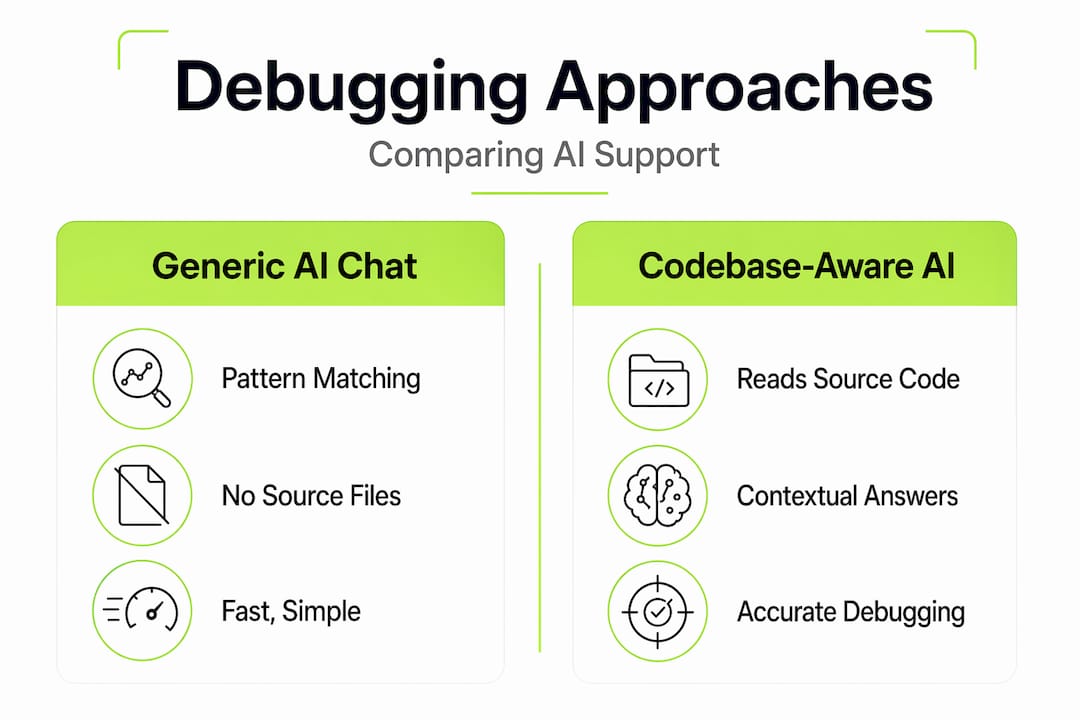
The practical recommendation is straightforward. For well-known frameworks and common errors, generic AI chat is fast and often good enough. Once your project reaches meaningful complexity, involves custom services, or powers real users, codebase-aware AI support stops being optional. The cost of wrong debugging advice at that stage is too high.
My take: what most teams get wrong about this
I have watched a lot of software teams adopt AI debugging tools with high expectations and hit a wall within weeks. The pattern is almost always the same. They assume that a smarter model will compensate for missing context. It will not.
The teams that succeed with codebase AI integration do one thing differently: they treat the index as infrastructure, not a feature. They maintain it, update it when the codebase changes, and test it regularly. The teams that struggle treat it as a plugin they installed once and forgot about.
What surprises most people is how much value shows up in customer support before it shows up in debugging. When your support agent can reference the actual code that processes a user's request, the quality of the answer to "why did my export fail?" goes from a generic checklist to a specific explanation tied to what your product actually does. That shift builds user trust faster than almost anything else.
The honest limitation I keep running into: codebase-aware AI is only as good as your retrieval setup. A poorly chunked index with stale embeddings will confidently give you wrong answers. That is worse than admitting uncertainty. Before you adopt any codebase-aware AI platform, ask hard questions about how it handles index updates and how it reports retrieval confidence. The technology is genuinely powerful when implemented well. When it is not, it just fails more expensively than generic AI.
— Dizzy
How Coevy brings codebase awareness into your support workflow
If your team is ready to move beyond documentation-based AI and into support that actually reads your code, Coevy is built for exactly that transition.

Coevy's platform embeds directly into your web app, capturing session replays, contextual bug data, and user feedback the moment issues occur. Its upcoming AI agent goes further: it reads your actual source code to generate precise debugging assistance and support responses tied to what your product genuinely does, not what documentation says it does. Auto-tagging, prioritization, and codebase-aware issue summaries reduce the manual triage work that slows most teams down. Whether you are a lean startup or a scaling SaaS team, Coevy grows with your product. Explore Coevy and see how capturing friction the moment it happens changes how fast your team resolves what matters.
FAQ
What is codebase-aware AI support?
Codebase-aware AI support is an AI system that indexes your actual source code using vector embeddings and semantic search, then uses that context to provide accurate debugging help and support responses grounded in your real project structure rather than generic knowledge.
How does codebase AI work differently from regular AI chat?
Regular AI chat pattern-matches against training data and guesses at solutions without seeing your files. Codebase-aware AI retrieves relevant code chunks from your indexed project before generating any response, producing answers that reference your actual functions, file paths, and dependencies.
Why do founders need codebase-linked AI support?
Founders running SaaS products need codebase-linked AI support because generic AI gives inaccurate answers about product-specific behavior, which erodes user trust and creates support bottlenecks that require senior developer time to resolve.
Can you train support agents on codebase-aware AI?
Yes. Connecting your support agent to an indexed codebase alongside your documentation produces significantly more accurate responses, because the agent can distinguish between what your docs describe and what your code actually executes.
What is Model Context Protocol and why does it matter?
Model Context Protocol (MCP) is an open standard that connects LLM applications to external tools and codebase data sources, allowing AI assistants to access your code and developer tools through a standardized integration layer rather than custom-built connectors for each platform.