Most customer service teams assume they already know what an AI support agent is. They picture a chatbot widget in the corner of a screen, spitting out FAQ answers. That assumption is costing them. Understanding what is an AI support agent explained correctly means recognizing a fundamentally different category of software. One that reasons, plans, and takes action across your entire support stack without waiting to be told what to do next.
Table of Contents
- Key takeaways
- What an AI support agent actually is
- The architecture powering modern AI agents
- The business case: what the numbers actually show
- How to implement AI agents without the common pitfalls
- My honest take on where teams get this wrong
- How Coevy helps you put this into practice
- FAQ
Key takeaways
| Point | Details |
|---|---|
| Agents vs. chatbots | AI agents execute multi-step workflows autonomously; chatbots respond one turn at a time. |
| Architecture matters | RAG and multi-agent systems dramatically improve accuracy and reduce hallucination risks. |
| ROI is fast | Businesses report payback in under 90 days and ticket volume reductions up to 70%. |
| Escalation design is critical | Robust handoff logic combining confidence scores and sentiment detection protects customer experience. |
| Treat agents as products | Continuous tuning, knowledge base upkeep, and CSAT measurement by resolution path drive lasting results. |
What an AI support agent actually is
The clearest way to understand an AI customer support agent is to contrast it with what came before. A traditional chatbot waits for a user to ask something, matches that input to a predefined script, and returns a canned response. That's the full extent of its capability. One turn in, one turn out.
An AI support agent operates on an entirely different model. AI agents reason, plan, and take action using CRMs, email systems, calendars, and ticketing platforms, and they adjust course when something goes wrong mid-task. They don't just respond to queries. They pursue goals.
Here's what that looks like in practice. A customer writes in saying their subscription renewal failed. A chatbot tells them to call billing. An AI agent checks the payment gateway for the failed transaction, identifies the card on file is expired, sends a secure update link to the customer's email, logs the interaction in the CRM, and marks the ticket resolved, all without a human touching it.
The core components that make this possible include:
- Large language models (LLMs): The reasoning engine that interprets intent and generates responses
- Tool integrations: Connections to CRMs, helpdesks, email platforms, and databases that let the agent act, not just talk
- Memory: Short-term context within a conversation and long-term storage of customer history
- Instructions and guardrails: The rules and policies that define what the agent can and cannot do
- Feedback loops: Mechanisms that flag failures and surface them for review
Common tasks AI agents handle include ticket triage and routing, password resets, order status lookups, appointment scheduling, billing inquiries, and first-level troubleshooting. These are the tasks that consume the most human agent hours and require the least human judgment.
The architecture powering modern AI agents
Understanding how AI support works at a technical level helps you make smarter deployment decisions. You don't need to be an ML engineer to grasp the key structures, but knowing them separates teams that deploy agents effectively from those that end up with expensive underperformers.
Retrieval-Augmented Generation (RAG)
One of the biggest risks with any generative AI system is hallucination. The model confidently produces an answer that sounds right but is factually wrong. RAG prevents hallucination by combining real-time retrieval from trusted company data with the generative model's language capabilities. Instead of relying on what the model learned during training, the agent queries your knowledge base, product documentation, or policy library at the moment of response and cites what it finds.
For customer support, this is not optional. It's the difference between an agent that tells a customer the correct return window and one that invents a policy that doesn't exist.
Split architectures and multi-agent systems
Not every task requires the same model. Split architectures optimize performance by routing simple intent classification to a small, fast model while reserving a larger, more capable model for complex response generation. This cuts latency and cost without sacrificing quality where it matters.
More sophisticated deployments use a four-role multi-agent architecture with discrete agents handling triage, resolution, knowledge retrieval, and escalation. Each agent is specialized and hands off to the next with context preserved. Think of it like a well-run support team where the first responder qualifies the issue, the specialist resolves it, and the supervisor steps in only when needed.
Meta-agents and continuous monitoring
The most advanced deployments now include meta-agents dedicated to monitoring other AI agents. These systems analyze failure logs, identify configuration gaps, and surface tuning recommendations without requiring a human to manually audit every conversation.
| Architecture component | Primary function | Key benefit |
|---|---|---|
| RAG layer | Real-time knowledge retrieval | Reduces hallucination, improves accuracy |
| Small intent model | Fast query classification | Lower latency, reduced compute cost |
| Large generation model | Complex response synthesis | Higher quality answers for nuanced issues |
| Multi-agent orchestration | Task handoff between specialized agents | Scalability and role separation |
| Meta-agent monitor | Continuous performance tuning | Sustained accuracy without manual review |
Pro Tip: Before selecting an AI agent platform, ask vendors specifically how their RAG pipeline is structured and how often the retrieval index is refreshed. Stale knowledge bases are the most common cause of agent accuracy degradation in production.
The business case: what the numbers actually show
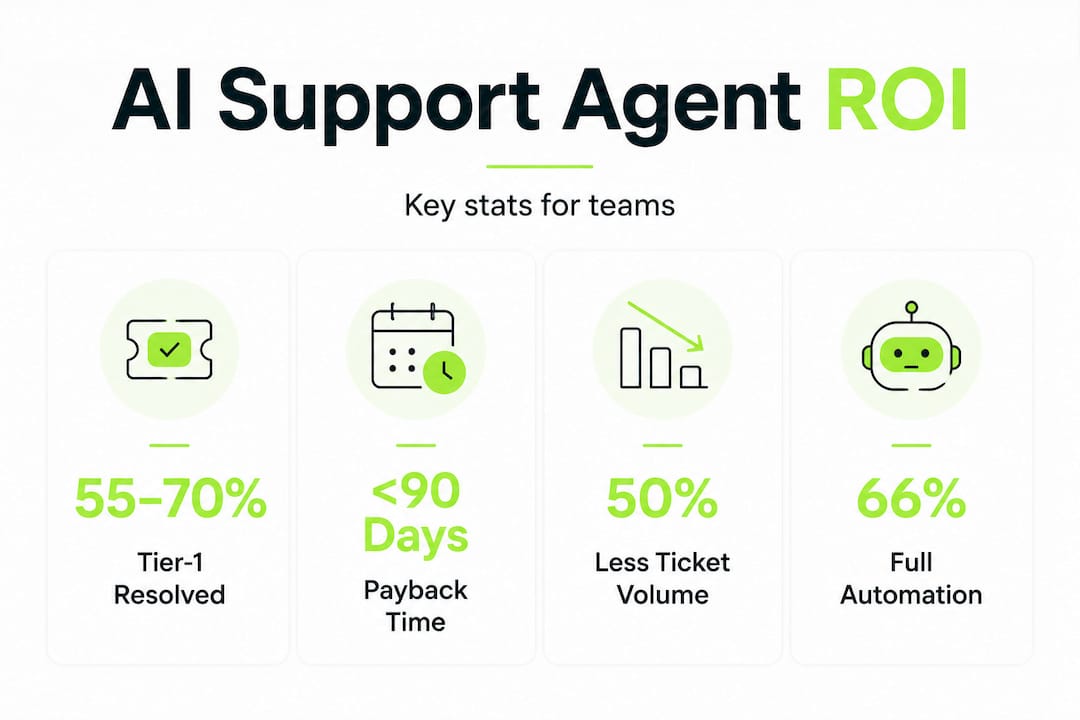
The performance data on AI support agents is strong enough that skepticism about ROI is harder to justify than it was two years ago. Tier-1 support agents autonomously resolve 55 to 70% of inquiries, with some implementations reporting 66% automation of total conversation volume. That's not a pilot program result. That's what teams are seeing in production.
The financial picture is equally compelling. Businesses deploying AI support automation achieve payback in under 90 days and reduce support ticket volume by up to 70%. For a team handling 10,000 tickets a month, that's 7,000 fewer tickets requiring human resolution.
| Metric | Typical result |
|---|---|
| Tier-1 resolution rate | 55 to 70% autonomous |
| Ticket volume reduction | Up to 70% |
| Payback period | Under 90 days |
| Response time improvement | Near-instant for covered queries |
What the numbers don't capture is the quality improvement that comes with well-designed handoffs. When an AI agent transfers a conversation to a human, it passes along a full summary of what was discussed, what was tried, and what the customer's current sentiment appears to be. The human agent picks up with context instead of starting from scratch. Customers feel the difference immediately.
The workload reduction for human agents is significant too. When repetitive tier-1 volume drops by half, your experienced agents spend their time on complex, high-value interactions where empathy and judgment genuinely matter. That's better for customers and better for employee retention.
How to implement AI agents without the common pitfalls
The teams that struggle with AI agent deployments almost always share one trait. They tried to automate everything at once. Start narrower than feels comfortable.
Pick a single channel and a single category of inquiry. Password resets on your web support portal, for example. Get that working well. Measure it. Then expand. This approach lets you build confidence in your escalation logic before it's handling high-stakes conversations at scale.
Here's a practical implementation sequence:
- Map your highest-volume, lowest-complexity ticket types. These are your first automation candidates. Look for queries where the resolution is deterministic and the data needed is already in your systems.
- Design escalation rules before you write a single prompt. Escalation logic requires multiple signals, including agent confidence thresholds, customer sentiment detection, and topic restrictions for sensitive categories like billing disputes or legal matters.
- Build and curate your knowledge base with the same rigor you'd apply to product documentation. Knowledge base quality is the biggest driver of AI agent accuracy and customer satisfaction. Outdated or ambiguous content is what causes agents to give wrong answers.
- Implement conversational memory and summarization from day one. When an agent hands off to a human, that human should receive a structured summary. Not a raw transcript. A summary.
- Measure CSAT separately by resolution path. Track satisfaction scores for AI-resolved conversations, human-resolved conversations, and escalated conversations independently. This tells you where the experience is breaking down.
Pro Tip: Set up a weekly review of conversations where the AI agent triggered an escalation. These are your richest source of training signal. Patterns in escalation reasons reveal gaps in your knowledge base and prompt design faster than any automated metric.
Effective deployment relies on multi-role architecture combined with policy-as-code guardrails and continuous measurement. Treat your AI agent the way you treat your product. It needs a roadmap, an owner, and a release cycle.
My honest take on where teams get this wrong
I've watched a lot of AI agent rollouts across customer service teams, and the pattern that frustrates me most is when organizations frame the entire initiative as a headcount reduction exercise. That framing poisons the implementation from the start.
When you treat AI agents purely as cost-cutting tools, you stop thinking about the customer experience they create. You skip the hard work of designing for failure modes. You under-invest in escalation quality. And then you wonder why CSAT scores dip three months after launch.
The teams that get this right think of their AI agent as a customer touchpoint. Every interaction the agent handles is a moment where your brand either earns trust or loses it. That mindset changes how you design the tone, the escalation triggers, and the handoff language.
What I've found actually works is building the escalation path first and the automation second. Know exactly what happens when the agent fails before you decide what it's allowed to try. That discipline forces you to think about the customer experience end to end, not just the happy path.
Tonal consistency is also underrated. An agent that sounds clinical and robotic before handing off to a warm, empathetic human creates a jarring experience. The agent's voice should feel like a natural extension of your support team, not a different product entirely. The customer service and experience distinction matters here more than most teams realize.
The best deployments I've seen treat the AI agent as a product that ships in iterations. Week one is narrow scope and heavy monitoring. Month three is expanded coverage and refined escalation. Month six is confident automation with a meta-agent watching the whole system. That's the arc that works.
— Dizzy
How Coevy helps you put this into practice
Understanding AI support agents is one thing. Deploying one that actually improves your customer experience is another challenge entirely.

Coevy is built specifically for software teams who need AI support that goes beyond documentation lookup. Its upcoming AI agent reads your actual codebase, which means it can give precise answers and debugging assistance tied directly to how your application works, not just what your help docs say. Combined with session replays, auto-tagging, and AI-generated bug reproduction steps, Coevy captures the full context of every user issue the moment it happens.
If you're a SaaS team trying to reduce inbound support volume while improving the quality of every interaction, explore what Coevy offers and see how codebase-aware AI changes what's possible. You can also dig into more technical breakdowns on the Coevy blog to keep building your understanding of AI support systems.
FAQ
What is an AI support agent?
An AI support agent is an autonomous software system that reasons, plans, and executes multi-step support tasks across integrated tools like CRMs and helpdesks, unlike chatbots that only respond to single queries.
How does an AI support agent differ from a chatbot?
Chatbots respond one turn at a time using predefined scripts. AI agents pursue goals across multiple steps, taking action in connected systems and adjusting when errors occur.
What percentage of support tickets can AI agents resolve?
AI agents autonomously resolve 55 to 70% of tier-1 support inquiries, with some teams reporting 66% automation across total conversation volume.
What is RAG and why does it matter for AI support?
RAG, or Retrieval-Augmented Generation, lets AI agents query your company's trusted data in real time before generating a response, which reduces hallucination risks and keeps answers accurate and grounded.
How long does it take to see ROI from an AI support agent?
Most businesses see payback in under 90 days, with support ticket volumes dropping by as much as 70% after a well-structured AI agent deployment.