A user privacy protection checklist for solo apps is the systematic process of implementing legally compliant controls to safeguard personal data, maintain transparency, and enable user data rights. Solo developers face the same GDPR and CCPA obligations as enterprise teams, but without a legal department or dedicated security staff. The industry term for this approach is privacy by design, and it means building privacy into your app from the first line of code rather than bolting it on before launch. This guide gives you a concrete, step-by-step checklist to meet 2026 regulatory standards and earn user trust from day one.

1. What belongs on a user privacy protection checklist for solo apps?
A complete privacy checklist covers five core areas: disclosure, data minimization, consent, user rights, and security controls. Each area maps directly to GDPR and CCPA requirements, so skipping any one of them creates a compliance gap.
- Privacy policy disclosure. Your policy must name every personal identifier you collect, explain how you use it, and list every third-party service that touches that data. Reviewing each third-party Data Processing Agreement typically takes 20–30 minutes per service. Budget that time before launch, not after.
- Data minimization. Collect only the data your app genuinely needs to function. Unnecessary permissions are a high-risk signal to users and auditors alike. A finance app requesting camera or contacts access is a red flag with no justification.
- Consent management. Obtain explicit, informed consent before collecting any sensitive data. Store a timestamped record of each consent event so you can prove it later.
- User data rights. Build mechanisms for users to access, export, and delete their personal data. GDPR and CCPA require you to fulfill these requests within 30 days.
- Security controls. Enforce HTTPS on every endpoint, encrypt data at rest, and implement proper authorization checks at the database level.
Pro Tip: Write your privacy policy as a living document. Every time you add a new third-party SDK or service, update the policy the same day you ship the integration.
2. How to meet app store privacy requirements in 2026
App stores require a publicly accessible privacy policy URL and a completed structured privacy disclosure form before your app goes live. A mismatch between your policy and your app's actual data collection behavior causes rejection. Here is how to stay aligned.
- Add your privacy policy URL to your store listing. Both App Store Connect and Google Play Console require this field. A broken or missing URL triggers an automatic rejection.
- Complete the privacy nutrition labels. Apple and Google both use structured questionnaires that ask exactly which data types your app collects and whether they are linked to user identity. Answer based on your actual binary behavior, not your intentions.
- File Apple's PrivacyInfo.xcprivacy manifest. Since 2024, Apple's PrivacyInfo.xcprivacy manifest requires iOS developers to declare the reasons they use Required Reason APIs, including those tied to device identification and tracking. Missing this file causes review rejection.
- Audit every third-party SDK. Each SDK you bundle may collect data independently. Check each vendor's Data Processing Agreement and confirm their disclosures match what you report in your store listing.
- Cross-check before every release. Run a quick comparison between your current privacy policy, your store labels, and your app's actual network calls. Tools like a proxy debugger can show you exactly what data leaves the device.
The key insight here is that your store listing and your privacy policy must describe the same app. Regulators and app review teams treat any gap as a violation, not an oversight.
3. Common privacy pitfalls solo developers must avoid
Solo developers make predictable mistakes that create serious exposure. Knowing them in advance is the fastest way to avoid them.
- Excessive permission requests. Requesting permissions your app does not need is the most visible privacy failure. Data minimization is the primary signal of trustworthiness to both users and auditors. Request only what your core feature requires, and request it at the moment the user needs it, not at app launch.
- Missing database-level authorization. Common vulnerabilities in solo apps include missing Row Level Security (RLS) and Broken Object Level Authorization (BOLA), where one user can access another user's records. These flaws cause data leaks that no privacy policy can fix.
- Exposed secret keys. API keys and credentials embedded in frontend bundles are readable by anyone who inspects your JavaScript or mobile binary. Store secrets server-side and rotate them immediately if they are ever exposed.
- Unsecured logging. Middleware often logs full request bodies, including passwords and API tokens, to external log aggregators by default. You must explicitly configure your logging layer to redact or exclude sensitive fields.
- Incomplete data deletion. Deleting a user's main database record is not enough. GDPR and CCPA require cascading deletion through backups, uploaded files, and every third-party service within 30 days. Build a deletion checklist that covers every data store your app touches.
Pro Tip: Before every release, run a search across your codebase for common secret patterns like "sk_live", "api_key", and "password". Automate this with a pre-commit hook using a tool like git-secrets.
4. How to build operational privacy workflows as a solo founder
Privacy by design becomes practical when you treat it as a repeatable workflow, not a one-time legal task. Operationalizing a lightweight privacy gate within your release process prevents expensive rework and regulatory problems later.
- Write a one-page data-flow summary for each new feature. Document what data the feature collects, where it goes, and how long you retain it. This takes 15 minutes and creates a paper trail that satisfies auditors.
- Assign yourself as the privacy owner. Even in a solo context, naming a privacy owner creates accountability. It means privacy decisions get made deliberately, not by default.
- Set privacy defaults to the most restrictive option. New features should collect no data unless you actively choose to enable collection. This is the core principle of privacy by design.
- Build a user data request workflow. Create a simple form or email address where users can submit access, export, and deletion requests. Log every request and its resolution date to prove compliance.
- Automate compliance checks. Use linting rules, pre-commit hooks, and automated dependency scans to catch privacy regressions before they reach production. Automation compensates for the absence of a team.
The practical value of this workflow is that it converts privacy from a vague obligation into a concrete checklist item on every sprint. Solo founders who use AI-powered support tools can also automate parts of the user request triage process, reducing manual overhead further.
5. Securing data in transit and at rest
Encryption is not optional. Every connection your app makes must use HTTPS, and every sensitive field stored in your database must be encrypted at rest.
Transport Layer Security (TLS) 1.2 or higher is the current minimum standard. Older TLS versions have known vulnerabilities and will fail security audits. Configure your server to reject connections below TLS 1.2 and test this with a tool like SSL Labs.
Database encryption protects user data if your hosting provider is ever compromised. Most managed database services, including those on AWS, Google Cloud, and Supabase, offer encryption at rest by default. Verify that it is enabled rather than assuming it is.
Password storage deserves special attention. Store passwords using bcrypt, Argon2, or scrypt. Never store plaintext passwords or use MD5 and SHA-1, which are broken for this purpose. This is a non-negotiable baseline for any app that handles authentication.
6. Managing third-party services and vendor risk
Every third-party service you integrate becomes part of your privacy surface. Payment processors, analytics platforms, error trackers, and email providers all receive some user data. You are responsible for how they handle it.
Request a Data Processing Agreement from every vendor that processes personal data on your behalf. A DPA is a contract that defines the vendor's obligations under GDPR. Without one, you are not compliant, regardless of your own practices.
Review each vendor's privacy policy to confirm their data retention and deletion practices align with yours. If a vendor retains data for five years and your policy promises deletion within 30 days, you have a gap. Resolve it before you go live, not after a user submits a deletion request.
Pro Tip: Keep a simple spreadsheet listing every third-party service, the data it receives, the legal basis for sharing, and the link to its DPA. Update it every time you add or remove a service.
7. Handling user data rights requests end to end
User data rights are the most operationally demanding part of solo app privacy. GDPR and CCPA give users the right to access their data, receive a copy, and demand deletion. You must fulfill each request within 30 days.
Build an access and export endpoint that returns a user's complete data record in a readable format, typically JSON. This does not need to be a polished UI. A simple authenticated API endpoint that triggers a data export email is sufficient for most solo apps.
Deletion is more complex than it appears. Cascading deletion must cover your main database, backups, file storage, analytics events, and every third-party service that holds the user's data. Build a deletion runbook that lists every system and the steps to remove data from each one.
Log every request with a timestamp and a resolution date. This log is your compliance evidence if a regulator ever asks whether you honored a user's rights.
Key Takeaways
A solo app that embeds privacy by design from the start meets GDPR and CCPA requirements, passes app store review, and builds the user trust that drives retention.
| Point | Details |
|---|---|
| Privacy policy must match behavior | Disclose every data type and third-party service your app actually uses, not just what you plan to use. |
| Data minimization signals trust | Request only permissions your core feature requires; unnecessary access is a red flag to users and auditors. |
| App store compliance is mandatory | Complete privacy labels in App Store Connect and Google Play Console, and file Apple's PrivacyInfo.xcprivacy manifest for iOS apps. |
| Deletion is more than one database | Cascading deletion must cover backups, file storage, and all third-party services within 30 days. |
| Privacy gate prevents rework | A one-page data-flow summary per feature, written before code ships, catches compliance gaps early and cheaply. |
Privacy is your competitive edge, not your compliance burden
Solo developers often treat privacy as the last item on the pre-launch checklist. That is the wrong order. Privacy decisions made late cost ten times more to fix than decisions made early. I have seen founders spend weeks retrofitting deletion workflows and consent flows into apps that were never designed to support them.
The developers who get this right treat privacy the same way they treat testing. They build it into the process, not onto the end of it. A one-page data-flow document per feature takes 15 minutes. A GDPR enforcement notice takes months to resolve. The math is obvious.
There is also a real business case here that most solo founders underestimate. Users notice when an app asks for fewer permissions than expected. They notice when a privacy policy is written in plain English. These signals build trust faster than any marketing copy. Privacy by design is not just a legal obligation. It is a product differentiator that costs you almost nothing if you start early.
The AI tools solo developers use for coding and support create new privacy risks that did not exist two years ago. Autogenerated middleware logs, AI-suggested database schemas without RLS, and third-party AI APIs that retain prompts are all live issues in 2026. Treat AI-generated code with the same skepticism you would apply to any unreviewed dependency.
— Dizzy
How Coevy fits into your privacy-first app workflow
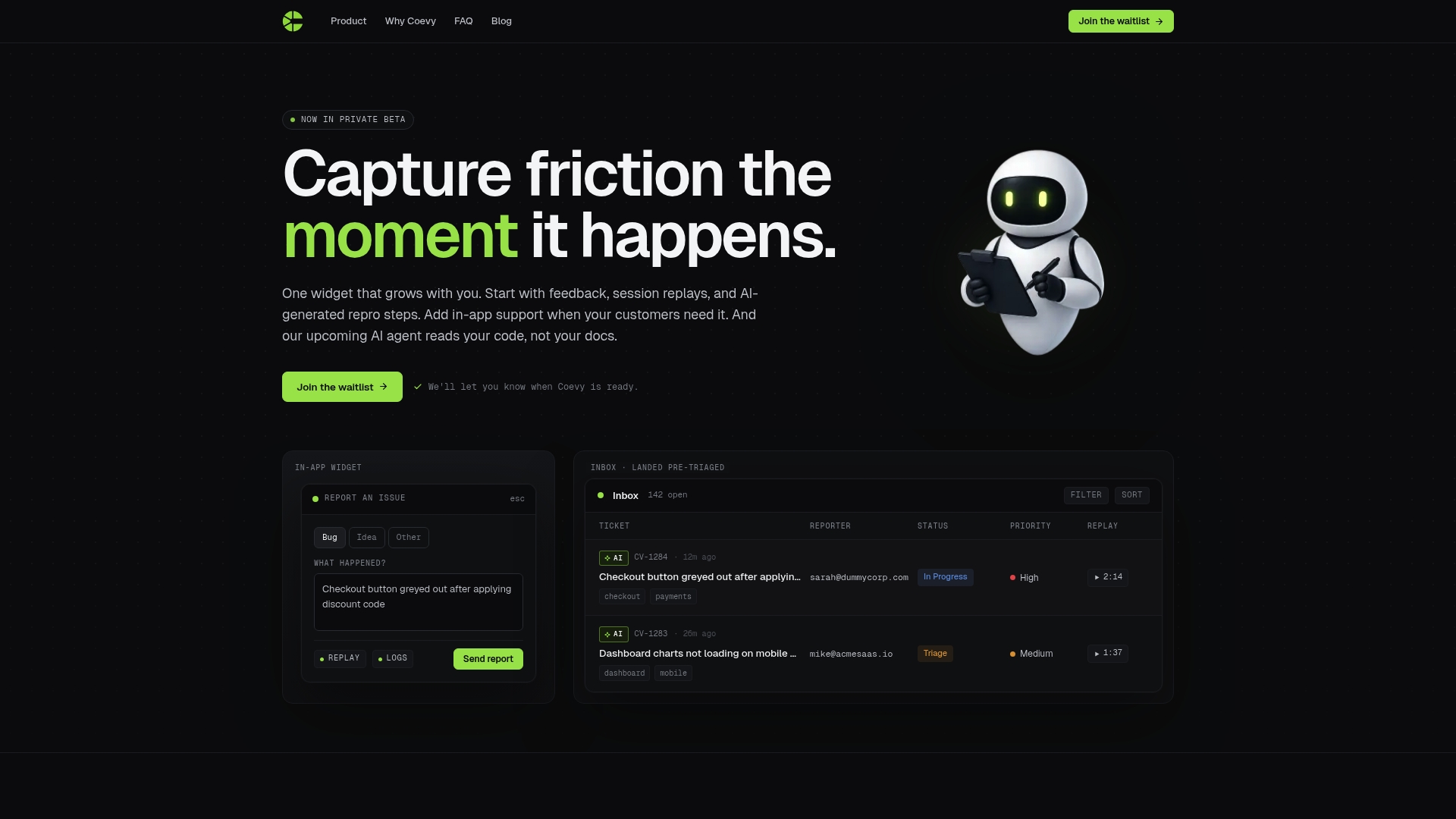
Building a privacy-conscious app means more than locking down your database. It means understanding where users experience friction, confusion, or distrust inside your product. Coevy's embedded feedback widget captures those moments in real time, attaching session context automatically so you know exactly what happened before a user hit a wall or abandoned a flow.
Coevy is GDPR-compliant by design, with field masking and IP anonymization built in. That means you collect the feedback you need without creating new privacy liabilities. For solo founders managing every function alone, Coevy's feedback tools give you the signal you need to fix privacy-related UX issues before they become support tickets or churn. It is the feedback layer your privacy-first app actually needs.
FAQ
What is a privacy checklist for solo apps?
A privacy checklist for solo apps is a structured list of controls covering disclosure, data minimization, consent, user rights, and security that a solo developer must implement to comply with GDPR and CCPA.
How long do I have to respond to a user data deletion request?
GDPR and CCPA both require you to complete deletion within 30 days, including cascading removal from backups, file storage, and all third-party services.
Does Apple require a privacy manifest for all iOS apps?
Yes. Apple's PrivacyInfo.xcprivacy manifest has been required since 2024 for any iOS app using Required Reason APIs. Missing it causes app review rejection.
What is the biggest security mistake solo app developers make?
Missing database-level authorization, specifically the absence of Row Level Security or the presence of Broken Object Level Authorization, is the most common and most damaging vulnerability in solo-built apps.
Do I need a Data Processing Agreement with every third-party service?
Yes. Any vendor that processes personal data on your behalf requires a DPA under GDPR. Without one, your app is non-compliant regardless of your own privacy practices.