In-app feedback collection setup is the process of integrating tools and workflows to capture user insights directly inside your software product. Product managers who get this right gain a real-time signal on what users actually experience, not what they remember days later in an email survey. In-app microsurveys commonly achieve 20–40%+ response rates, far outperforming email outreach. That gap exists because the prompt appears while the user is engaged, not after they have already moved on. This guide walks through every stage of a feedback implementation, from prerequisites and SDK setup to behavioral triggers and quality control.
What does an in-app feedback collection setup guide actually cover?
An in-app feedback collection setup guide covers four things: tool selection, technical integration, trigger configuration, and data quality. Most teams treat it as a purely technical task and skip the strategy. That is where programs fail. The benefits of in-app feedback collection only materialize when the right question reaches the right user at the right moment. Getting the setup right from day one prevents the most common failure modes: surveys no one sees, data no one trusts, and users who stop responding.
What tools and prerequisites do you need?
Before writing a single line of integration code, you need three things in place: a feedback platform account, a compatible SDK, and a clear user identification plan.

Most standard SDKs support Android API 16 and above, and React Native projects require the netinfo dependency alongside the core SDK package. Platform compatibility is non-negotiable. A mismatch between your app's minimum API version and the SDK's requirements will silently block feedback prompts from rendering.
User identification matters as much as the SDK itself. Passing logged-in user identifiers and custom attributes into the SDK at initialization enables segmentation from day one. Without it, you collect a pile of anonymous responses you cannot act on.
| Requirement | What to check |
|---|---|
| Platform compatibility | Android API 16+, iOS 13+, or React Native netinfo dependency |
| User identification | Pass user ID and key attributes at SDK initialization |
| Trigger strategy | Define behavioral events before writing any code |
| Privacy compliance | Confirm GDPR field masking and IP anonymization settings |
| Bot filtering | Plan for filtering non-human accounts before launch |
Pro Tip: Map your key behavioral events in a spreadsheet before touching the SDK. Knowing exactly which user actions will trigger feedback saves significant rework later.
How do you implement an in-app feedback system step by step?
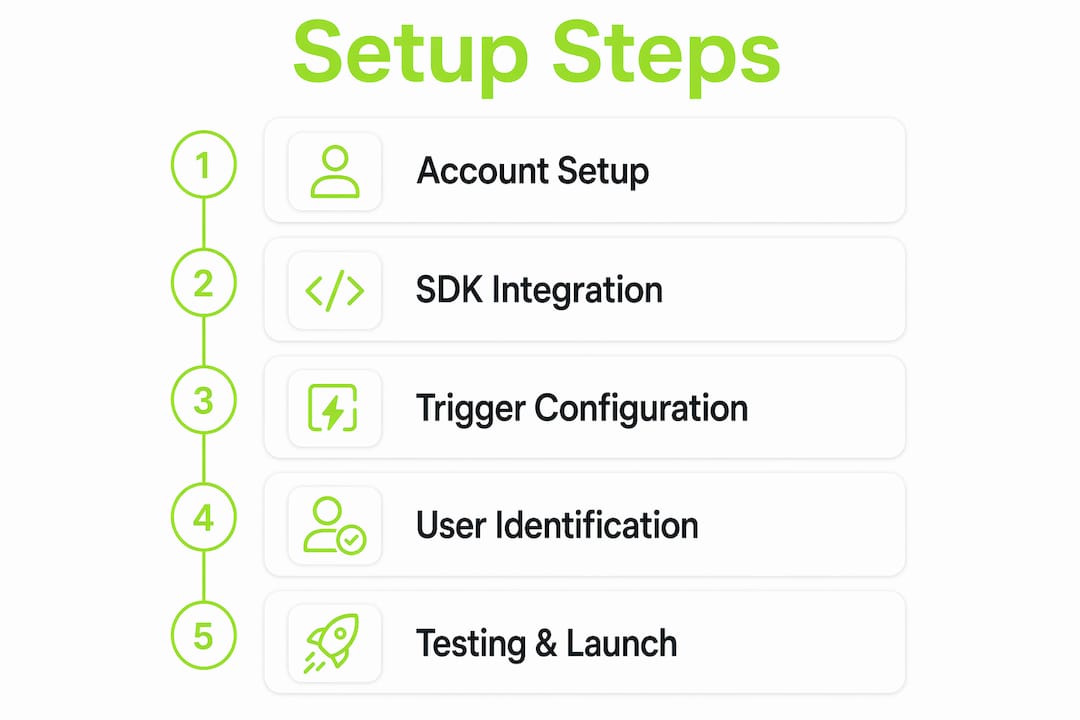
Integrating standard in-app feedback SDKs typically requires 30–45 minutes of developer effort for a basic setup. That estimate assumes prerequisites are already in place. Follow this sequence to stay on track.
Create your platform account and prepare your surveys. Log into your feedback platform and draft the specific questions you want to ask. Keep each survey to one or two questions. Long surveys kill response rates before the SDK even matters.
Install the SDK dependency. For Android, add the SDK to your
build.gradlefile. For React Native, run the three required npm commands: install the core package, installnetinfo, and link native dependencies. Confirm the installation compiles without errors before moving forward.Initialize the SDK with your token and user attributes. Place the initialization call as early as possible in your app lifecycle, typically in
Application.onCreate()for Android or the root component for React Native. Pass your SDK token, the logged-in user's ID, and any custom attributes such as plan type or account age. SDKs automatically capture device details like OS version and device type, but custom attributes require explicit passing.Define behavioral triggers for each survey. Attach feedback prompts to specific user actions rather than time intervals. A prompt after a user completes their third export is far more relevant than one that fires after 30 seconds on any screen. Map each survey to the event that makes it contextually meaningful.
Configure optional parameters. Set display frequency caps so no user sees the same survey twice in a short window. Enable or disable specific device types if your feedback goals differ between mobile and desktop. Configure any privacy settings required by your compliance obligations, including field masking for sensitive inputs.
Test in a staging environment. Trigger each feedback event manually and confirm the survey renders correctly on both Android and iOS. Check that user attributes appear correctly in your platform dashboard. Verify that the survey does not appear for users who have already responded.
Launch and monitor the first 48 hours. Watch response rates and check for initialization errors in your crash reporting tool. A response rate near zero usually signals an SDK initialization order problem, not a survey design issue.
Pro Tip: For React Native specifically, the SDK token initialization must complete before any trigger calls fire. A race condition here is the single most common cause of surveys that never display.
What are the most common mistakes in feedback setup and how do you fix them?
Most feedback collection mistakes come from triggering surveys on generic time intervals rather than behaviorally meaningful moments. The fix is not a better survey. The fix is a better trigger.
- SDK initialization errors. If surveys never appear, check that the initialization call runs before any trigger events. In React Native, an incorrect dependency installation order for
netinfois the most frequent culprit. - Bot and non-human account contamination. Up to 80% of daily signups on professional SaaS products can be automated bots. Bots distort your feedback data unless you filter them out. Apply user verification checks before including any account in your feedback audience.
- Survey fatigue from over-prompting. Showing a survey on every session destroys response quality over time. Set frequency caps and respect them. One well-timed prompt per user per week is a reasonable starting ceiling.
- Missing user attributes at initialization. Passing a null or empty user ID at SDK init means every response is anonymous. You lose the ability to segment by plan, feature usage, or churn risk.
- No privacy configuration. Collecting feedback without field masking or IP anonymization creates compliance exposure. GDPR requires that personally identifiable data be handled explicitly.
Compliance note: Before launching any feedback collection program, confirm that your SDK configuration masks sensitive form fields and anonymizes IP addresses. Collecting personal data without explicit consent or proper safeguards violates GDPR and similar regulations. Review your privacy settings before your first live survey fires.
What are the best practices for effective in-app feedback collection?
The highest-performing feedback programs combine two distinct channels: a continuous passive channel and a scheduled active probe. The passive channel captures breadth. The active probe captures depth. Running only one of the two leaves a significant gap in your understanding.
Targeting specific user cohorts based on behavior produces higher quality feedback than sending the same prompt to all users. Segment by recent feature usage, subscription tier, or churn signals. A user who just hit a paywall needs a different question than a power user who has been active for 90 days.
Churn signals deserve special attention. Surveys triggered at the moment a user cancels a subscription capture the freshest and most honest exit data available. That information is worth more than a dozen post-cancellation email surveys sent a week later.
| Trigger strategy | Best use case | Risk |
|---|---|---|
| Behavioral milestone | Post-feature completion, onboarding finish | Requires event tracking setup |
| Churn signal | Cancel flow, inactivity threshold | Must act on data quickly |
| Passive persistent widget | Always-on feedback button | Lower response depth |
| Scheduled active probe | Weekly targeted cohort survey | Risk of fatigue if too frequent |
Pro Tip: Build your feedback cadence around user milestones, not calendar dates. A user who just completed their first successful workflow is primed to give you their most honest reaction.
Leveraging the in-app feedback tools comparison available for SaaS teams helps you match trigger capabilities to your product's specific event model. Not every platform supports custom behavioral events out of the box. Verify trigger flexibility before committing to any tool.
Key Takeaways
Effective in-app feedback collection requires behavioral triggers, clean user identification, bot filtering, and a dual-channel program combining passive and active surveys.
| Point | Details |
|---|---|
| Behavioral triggers over time intervals | Attach surveys to specific user actions, not generic schedules, for higher quality responses. |
| User identification at initialization | Pass user ID and custom attributes at SDK init to enable meaningful segmentation. |
| Bot filtering is non-negotiable | Filter automated accounts before launch to prevent data distortion in your feedback program. |
| Dual-channel feedback program | Combine a passive always-on widget with periodic targeted active surveys for breadth and depth. |
| Privacy configuration before launch | Configure field masking and IP anonymization before any live survey fires to stay GDPR-compliant. |
The targeting problem nobody talks about
Most product teams I have worked with spend weeks debating which feedback tool to use and about 20 minutes thinking about who they are actually going to ask. That ratio is backwards. The tool matters far less than the targeting logic behind it.
The teams that get the best feedback are not the ones with the most sophisticated survey platforms. They are the ones who know exactly which user action signals readiness to respond. A user who just completed their first successful data export is in a completely different mental state than a user who has been idle for two weeks. Sending both the same survey is a waste of everyone's time.
The churn signal trigger is the most underused technique I see. Teams collect exit survey data but trigger it days after cancellation via email. By then, the user has moved on emotionally. Triggering the survey at the exact moment of cancellation, inside the product, captures something email never will: the raw, unfiltered reason they are leaving.
The other shift worth making is from periodic surveys to always-on programs. A persistent passive feedback widget costs almost nothing to maintain and creates a continuous signal. Pair it with a targeted active survey for a specific cohort each week and you have a feedback program that actually shapes your roadmap instead of validating decisions you already made.
— Dizzy
How Coevy fits into your feedback setup

Coevy is built for product teams who want feedback collection, session replays, and bug reporting in a single embedded widget. The platform attaches contextual session data automatically to every report, so your team spends less time reproducing issues and more time fixing them. Coevy's AI auto-tagging organizes incoming feedback without manual triage, and its GDPR-compliant configuration includes field masking and IP anonymization out of the box. For teams ready to move beyond basic survey tools, Coevy's feedback platform connects user insights directly to your support and development workflow from day one.
FAQ
What is in-app feedback collection?
In-app feedback collection is the practice of capturing user opinions, bug reports, and satisfaction signals directly inside a software product using embedded widgets or SDK-triggered surveys.
How long does it take to set up an in-app feedback SDK?
A basic SDK setup typically takes 30–45 minutes of developer effort, covering account creation, dependency installation, and initialization.
Why are my feedback surveys not showing up?
The most common cause is an SDK initialization error, where the trigger fires before the SDK token is fully initialized. In React Native, an incorrect netinfo installation order is the leading culprit.
How do I prevent survey fatigue in my users?
Set frequency caps so no user sees the same survey more than once per week, and use behavioral triggers instead of time-based prompts to keep surveys contextually relevant.
What user data should I pass to the feedback SDK?
Pass the logged-in user's ID, subscription plan, account age, and any feature-usage flags at initialization. This data enables segmentation and richer feedback context for every response you collect.