Auto-tagging support tickets with AI is the process of automatically labeling and categorizing incoming customer queries using natural language processing and machine learning, so your team spends time resolving issues instead of sorting them. AI-driven tagging reaches approximately 89% accuracy, compared to 60 to 70% for manual tagging, and it does the job in under one second per ticket. Platforms like Zendesk, Intercom, and Zapier already support the integrations needed to deploy this in most SaaS support environments. If your team is still manually triaging tickets, you are leaving measurable efficiency on the table.
How to auto-tag support tickets with AI: prerequisites and setup
Before you configure any AI classifier, three things need to be in place: the right tools, the right data, and a well-designed tag taxonomy. Skipping any one of these is the most common reason AI tagging projects stall after the pilot.
Tools and integrations you need

Most SaaS support teams already use a helpdesk platform that supports AI integration. Zendesk, Intercom, and Help Scout all offer API access that lets an external AI model read incoming tickets and write tags back to ticket fields. If you want to connect an LLM like GPT-4 or Claude without writing custom code, no-code workflow tools like Zapier or n8n let you build that bridge in hours, not weeks. For teams with engineering resources, a direct webhook setup gives you more control over confidence thresholds and fallback logic.
You also need API permissions that allow the AI to update ticket fields, not just read them. This sounds obvious, but many helpdesk configurations lock field editing to admin roles, which blocks automated tagging at the last step.
Data and taxonomy requirements

Historical ticket data is your most valuable asset here. A minimum of 500 to 1,000 labeled tickets gives an LLM enough examples to understand your product's specific issue types. If you are using a prompt-based approach rather than a fine-tuned model, structured examples in the prompt itself can substitute for a large training set.
Your classification taxonomy, meaning the actual list of tags and categories, needs to be designed before you touch any AI configuration. AI leverages NLP to detect context, intent, urgency, and sentiment, but it can only assign tags that exist in your system. A bloated tag list with 80 overlapping labels will produce inconsistent results regardless of model quality. Aim for 10 to 20 primary tags covering your most common issue types, with secondary tags for priority and product area.
Pro Tip: Before building anything, export your last 90 days of tickets and count how often each existing tag appears. Tags used fewer than 10 times in 90 days are candidates for removal or consolidation.
Step-by-step process for setting up AI ticket tagging
This process works whether you are using a no-code tool like Zapier or a custom webhook. The steps are the same. The technical complexity varies.
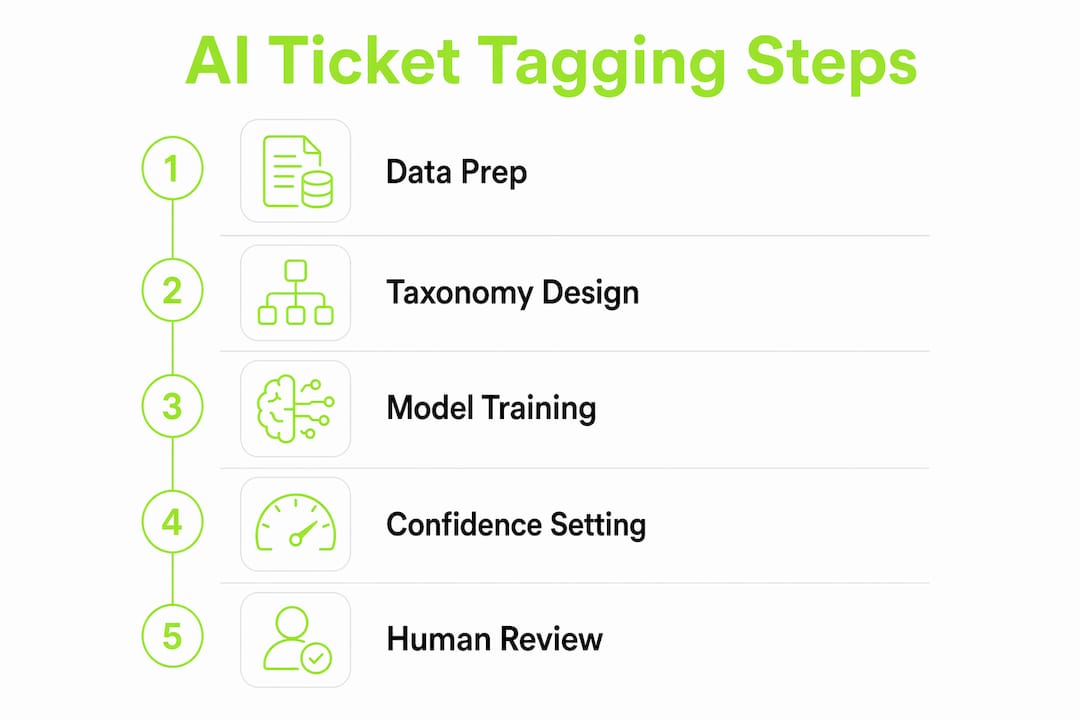
Audit your current tags. Export all tickets from the past six months and identify your top 15 issue types by volume. These become the foundation of your taxonomy. Discard tags that are redundant, vague, or rarely used.
Design your classification taxonomy. Decide whether you need single-label or multi-label tagging for multiple intents. Most SaaS support queues benefit from multi-label classification because a single ticket often contains a billing question and a bug report simultaneously.
Build your AI classifier. If you are using an LLM via API, write a system prompt that defines each tag with a one-sentence description and three to five example tickets. If you are using a dedicated classification tool, upload your labeled historical data as training examples. Tools like Zapier can connect your helpdesk to OpenAI's API without custom code.
Configure triggers and workflows. Set up a webhook or automation rule in your helpdesk that fires every time a new ticket arrives. The trigger sends the ticket body to your AI classifier and writes the returned tags back to the ticket record. In Zendesk, this is a trigger plus a webhook. In Intercom, it is a custom action in their workflow builder.
Add priority scoring and routing rules. Once tags are applied, configure routing rules that send tickets with specific tags to the right agent group. A tag like "payment failure" should route to billing specialists and trigger an SLA timer. A tag like "feature request" can go to a lower-priority queue.
Run shadow mode before going live. Shadow mode means the AI applies tags in the background while agents continue tagging manually. You compare the two sets of tags for two weeks and measure agreement rate. This step builds agent trust and surfaces edge cases before they affect customers.
Measure, iterate, and launch. After shadow mode, review disagreements between AI and human tags. Adjust your prompt or taxonomy based on patterns. When agreement rate exceeds 85%, switch to full automation and monitor weekly.
| Setup phase | Key action | Success metric |
|---|---|---|
| Taxonomy design | Define 10 to 20 primary tags | Zero overlapping definitions |
| Classifier build | Write prompt with tag descriptions and examples | Agreement rate above 70% in testing |
| Shadow mode | Run AI and human tagging in parallel | Agreement rate above 85% |
| Full launch | Activate automated tagging and routing | Triage time under 45 seconds per ticket |
Pro Tip: Set a confidence threshold in your classifier output. An 80% confidence threshold is a practical starting point. Tickets below that threshold get flagged for human review instead of auto-tagged, which keeps your error rate low while automation handles the majority.
How AI auto-tagging improves support workflows and metrics
The operational impact of automated support ticket tagging is not marginal. Triage time drops from roughly 4 minutes to under 45 seconds, an 80% efficiency gain that compounds across every ticket your team handles. For a team processing 500 tickets per day, that is roughly 27 hours of agent time recovered daily.
The accuracy improvement matters as much as the speed gain. Manual tagging degrades under volume pressure. Agents working through a backlog at the end of a shift make more errors than agents working through a fresh queue in the morning. AI tags every ticket with the same attention regardless of queue depth or time of day. This consistency directly improves routing accuracy, which reduces misroutes and the escalations that follow them.
The downstream metrics tell the same story. First response times can drop by 45% to 97% depending on how severe your manual bottlenecks were before automation. One documented case saw SLA breaches fall from 27% to below 5% within 10 days of deploying AI triage and tagging. That is not a gradual improvement. It is a structural change in how your queue operates.
Beyond the numbers, there is a team morale dimension that rarely appears in case studies. Agents who spend less time on repetitive sorting have more cognitive capacity for complex tickets. Consistent tagging and faster routing empower agents to focus on resolution quality rather than queue management. That shift shows up in CSAT scores and in agent retention, two metrics that are expensive to ignore in a competitive hiring market. For a deeper look at how AI is changing support team structures, the analysis on AI reshaping SaaS support staffing covers the organizational implications in detail.
Common challenges and best practices for AI auto-tagging
AI tagging is not a set-and-forget system. The teams that get lasting results treat it as a living workflow, not a one-time deployment.
Misclassification and edge cases
Every AI classifier misclassifies some tickets. The question is not whether errors happen but how you catch and correct them. Human-in-the-loop review remains best practice for edge cases, and it serves a second purpose: every correction becomes training data that improves the model over time. Build a "Needs Review" queue for low-confidence tickets and assign one agent per shift to validate them. That agent's corrections feed directly back into your prompt or model.
Tag sprawl
Tag sprawl happens when teams add new tags reactively without removing or consolidating old ones. A taxonomy that starts at 15 tags can balloon to 60 within a year if no one owns it. A clear and constrained tag taxonomy is critical for clean routing and reporting. Assign one person as taxonomy owner and schedule a quarterly review to prune, merge, or rename tags based on usage data.
Change management with agents
Agents who feel replaced by automation disengage from the process and stop correcting AI errors, which degrades model quality over time. Frame AI tagging as a tool that handles the repetitive work so agents can focus on the conversations that actually require human judgment. Explain the override process clearly. Agents should know they can correct any AI tag and that their corrections improve the system. Transparency here is not optional. It is what makes the human-in-the-loop model actually work.
Metrics to monitor after launch
Track four numbers weekly: tagging accuracy rate, coverage rate (percentage of tickets auto-tagged versus flagged for review), average triage time, and cost of errors (misrouted tickets that required escalation). If accuracy drops below 80%, review recent ticket patterns for new issue types your taxonomy does not cover. If coverage drops, your confidence threshold may be too conservative.
Pro Tip: Do not automate routing for your highest-stakes ticket types, such as enterprise account escalations or legal complaints, until your classifier has at least 90 days of production data on those categories. The cost of a misroute in those cases outweighs the efficiency gain.
Key takeaways
AI auto-tagging converts unstructured support tickets into structured, routable signals in under one second, replacing a manual process that takes 30 to 90 seconds per ticket and produces inconsistent results.
| Point | Details |
|---|---|
| Accuracy benchmark | AI tagging reaches 89% accuracy versus 60 to 70% for manual tagging. |
| Triage time reduction | Automated tagging cuts triage from 4 minutes to under 45 seconds per ticket. |
| Taxonomy design first | Define 10 to 20 primary tags before configuring any AI classifier. |
| Shadow mode before launch | Run AI and human tagging in parallel for two weeks to validate accuracy and build agent trust. |
| Human-in-the-loop is permanent | Assign agents to review low-confidence tickets and feed corrections back into the model continuously. |
Why AI tagging is a decision layer, not just a label
I have seen support teams treat AI tagging as a glorified autocomplete feature, a way to save a few clicks per ticket. That framing undersells what the technology actually does and leads to underinvestment in taxonomy design and model iteration.
The more accurate mental model is that AI auto-tagging acts as the decision layer in your support stack. It converts raw, unstructured customer messages into structured signals that every downstream workflow depends on: routing rules, SLA timers, priority queues, escalation triggers, and reporting dashboards. When that layer is unreliable, everything built on top of it is unreliable too.
The teams I have seen get the most from this technology share two habits. First, they treat the taxonomy as a product. They own it, version it, and review it on a schedule. Second, they run shadow mode longer than feels necessary, often four to six weeks instead of two. The extra time surfaces edge cases that a two-week pilot misses entirely, and it gives agents enough exposure to the AI's behavior that they trust it before it goes live.
The SLA improvement numbers are real. Dropping from 27% SLA breach rate to below 5% in 10 days is not a marketing claim. It is what happens when routing becomes consistent and fast. But those results require the unglamorous work of taxonomy design, shadow mode validation, and ongoing human review. Skip those steps and you get a classifier that works in demos and fails in production.
For teams building toward an AI-first support model, auto-tagging is the right place to start. It is the highest-leverage, lowest-risk entry point into support automation.
— Dizzy
See AI auto-tagging in action with Coevy
Coevy is built for exactly this workflow. Its AI-powered auto-tagging, prioritization, and routing features work inside your existing SaaS support environment without requiring a separate integration project. Coevy attaches contextual session data to every ticket automatically, so the AI has richer signal to classify from, not just the ticket text.

Unlike generic AI tools bolted onto helpdesks, Coevy reads your actual codebase to provide classification and debugging assistance tied to your specific application. If you are managing a growing support queue and want to see what 80% faster triage looks like in practice, explore Coevy's platform and request a demo. The efficiency gains are measurable from the first week of deployment.
FAQ
What does it mean to auto-tag support tickets with AI?
Auto-tagging support tickets with AI means using a machine learning model or LLM to automatically apply category labels to incoming tickets based on their content, intent, and urgency. The process replaces manual tagging and typically completes in under one second per ticket.
How accurate is AI auto-tagging compared to manual tagging?
AI auto-tagging reaches approximately 89% accuracy, while manual tagging typically lands between 60% and 70%. The gap widens further during high-volume periods when agent fatigue increases human error rates.
What helpdesk tools support AI ticket tagging?
Zendesk, Intercom, and Help Scout all offer API access that supports AI auto-tagging integrations. No-code platforms like Zapier and n8n can connect these helpdesks to LLMs like GPT-4 without custom engineering work.
How do I handle AI tagging errors?
Set a confidence threshold, typically around 80%, so tickets the model is uncertain about get flagged for human review rather than auto-tagged. Human-in-the-loop review catches errors and generates correction data that improves the classifier over time.
How long does it take to see results from AI auto-tagging?
One documented case saw SLA breaches drop from 27% to below 5% within 10 days of deployment. Most teams see measurable triage time reductions in the first week, though full accuracy optimization typically takes 30 to 90 days of production data and iteration.