Most product teams discover too late that AI support is not plug-and-play. You integrate a chatbot, point it at your docs, and assume it will handle the load. Then your product grows, your user base triples, and your support queue becomes a mess of unanswered tickets, frustrated users, and escalations your team cannot keep up with. Understanding how AI support grows with your product is the difference between a system that compounds in value over time and one that quietly degrades while you are focused elsewhere.
Table of Contents
- Understanding AI support growth alongside your product
- Financial impact and efficiency gains from AI customer support
- The critical role of knowledge base quality in AI support growth
- Designing your AI support system for scalability and quality
- Why most AI support projects fail and how a living knowledge base changes the game
- Discover scalable AI support solutions with Coevy
- Frequently asked questions
Understanding AI support growth alongside your product
AI-powered support does not scale automatically just because you flip it on. The more your product grows, the more diverse and complex the questions become. A tool that handled basic onboarding questions in year one will struggle with billing edge cases, integration failures, and feature-specific bugs in year three unless you have deliberately built around it.
Gartner projects that 80% of routine customer interactions will be fully handled by AI by the end of 2026. That number tells you where the industry is heading, but it says nothing about the work required to get there. The companies hitting that mark are not the ones who installed an AI and walked away. They are the ones treating AI support as a system that needs the same product attention as the rest of their application.
At its core, understanding the customer service and experience difference helps you decide what AI should own and what it should not. Customer service is transactional. Customer experience is cumulative. AI is excellent at the former and needs human backup for the latter.
Here is what changes as your product scales and why each element matters:
- Query volume and variety increase. Early-stage products have predictable questions. Mature products surface edge cases AI has never seen. Your knowledge base must expand in parallel.
- Integration depth becomes critical. AI support that cannot access your CRM, order history, or account status gives generic answers. Users stop trusting it fast.
- Escalation rules need revision. A threshold that worked for 500 users may be too aggressive or too lenient for 50,000. Hybrid escalation policies protect your brand at every growth stage.
- Knowledge base structure becomes load-bearing. Unstructured documentation buries the signal. Organized, single-topic articles let AI retrieve the right answer quickly and confidently.
AI support automation compounds in value when these four elements grow together. Skip one and the others underperform.
Financial impact and efficiency gains from AI customer support
The numbers here are not subtle. AI agents resolve tickets at about $0.46 each versus $4.18 for human agents. That is a 9x cost reduction per ticket. For a SaaS company handling 10,000 tickets a month, that is the difference between a $41,800 monthly support cost and a $4,600 one. Those savings do not disappear into overhead. They fund product development, sales, or a leaner team focused on genuinely complex customer problems.
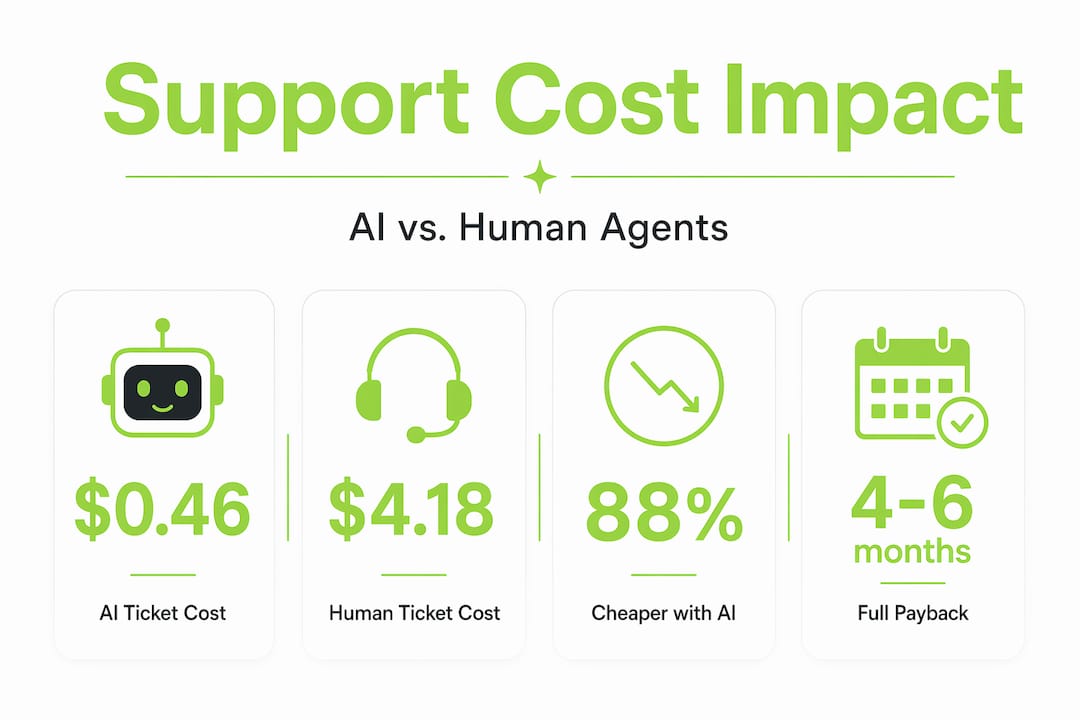
The financial gains from AI support hit faster than most finance teams expect. Most AI support programs reach full payback within 4 to 6 months of proper implementation. But "proper" is the operative word.
| Metric | Human agents | AI agents |
|---|---|---|
| Cost per resolved ticket | $4.18 | $0.46 |
| Average resolution time | 12 to 24 hours | Under 2 minutes |
| Scalability under load spikes | Limited by headcount | Effectively unlimited |
| Consistency across responses | Variable | High |
| Payback period on investment | Not applicable | 4 to 6 months |
The efficiency story is not just about cost. Teams that adopt AI support find that their human agents shift from answering the same question 80 times a day to handling the cases that actually require judgment, empathy, and product knowledge. That shift has real retention benefits. Good support engineers do not burn out doing mechanical triage.
Pro Tip: Track two metrics from day one: escalation rate and CSAT (customer satisfaction score) on AI-handled tickets. If escalation climbs steadily, your knowledge base is falling behind your product. If CSAT on AI tickets drops, your escalation threshold is too high and users are getting stuck.
One note worth flagging: the Coevy blog regularly covers how product teams are applying AI support to reduce overhead without sacrificing quality, which is worth bookmarking as your program matures.
The critical role of knowledge base quality in AI support growth
Here is a truth that does not get said enough: your AI support system is only as good as the content you feed it. Teams that invest in structured, customer-language documentation consistently outperform teams that dump existing internal docs into their AI platform and call it done.

Internal documentation is written for engineers. It assumes context, uses jargon, and skips the questions users actually ask. Customer-facing knowledge base content has to be written entirely differently.
Building a knowledge base that actually powers AI growth means following a specific discipline:
- Write one topic per article. AI retrieval systems work by matching a query to a chunk of content. A single article covering five topics confuses the retrieval process and returns partial or blended answers. One clear topic, one article.
- Use the language your customers use. If users say "my card was declined," do not title the article "payment method validation failure." Write in the words that appear in your support tickets.
- Review content on a fixed cycle. Features change. Pricing structures change. Integrations change. An article written 14 months ago about your checkout flow may describe a UI that no longer exists. Stale content creates AI hallucinations that erode trust quickly.
- Gap-fill using real ticket data. Your open tickets are a direct map of what your knowledge base does not cover. Mine them monthly.
- Separate procedural content from conceptual content. "How to reset your password" belongs in a different article than "Why our authentication system requires two-factor login." Mixing them makes AI responses harder to construct and harder for users to follow.
Pro Tip: Run a monthly query mining session. Pull the top 20 questions AI could not answer or escalated in the last 30 days. These are your content gaps. Assign each one as a knowledge base article and close the loop before the next cycle.
Understanding your users deeply is also the foundation of good customer feedback software practice. The questions people ask in support are often the same things they wished the product explained better. Feed that signal back into your product roadmap.
Designing your AI support system for scalability and quality
The dominant architecture in 2026 puts AI in charge of tier-1 interactions and hands off to humans through a hybrid escalation policy. This is not a cost-saving compromise. It is the right design for both quality and scale.
A well-designed AI support system has five structural elements:
- Tiered handling rules. Define clearly which question types AI owns and which trigger human review. Anything involving billing disputes, account cancellations, or negative sentiment should escalate immediately.
- Conversation context persistence. If a user asks three follow-up questions, the AI must remember the full thread. Losing context mid-conversation forces users to repeat themselves. Nothing erodes trust faster.
- Helpdesk integration. AI that operates outside your existing ticketing system creates a parallel workflow that nobody manages well. Connect it directly so every interaction is logged, tagged, and visible to your team.
- Confidence thresholds with transparency. When the AI is not sure, it should say so and escalate, not guess and frustrate. Set explicit confidence thresholds below which the system routes to a human.
- Feedback loops on every resolved ticket. A simple thumbs up or thumbs down on AI responses generates the training signal you need to improve accuracy over time.
| Design choice | What it protects | What it risks if skipped |
|---|---|---|
| Hybrid escalation | Brand reputation and CSAT | Users stuck in bad AI loops |
| Context persistence | Resolution quality | Repetitive, frustrating interactions |
| Helpdesk integration | Team visibility and workflow | Shadow tickets no one sees |
| Confidence thresholds | Accuracy and trust | AI confidently wrong |
| Feedback loops | Continuous improvement | Stagnant AI performance |
Pro Tip: Start with conservative escalation thresholds. It is better to over-escalate early and tune down as you gather performance data than to under-escalate and damage user trust in the first 90 days. You can find additional design guidance on the Coevy blog that covers real-world implementation patterns for SaaS teams.
Why most AI support projects fail and how a living knowledge base changes the game
The uncomfortable truth about AI support is that failure rarely happens at implementation. It happens six months later, quietly, when nobody is watching. Teams spend weeks getting the integration right, celebrate the cost savings in month two, and then stop actively managing the system. The knowledge base goes stale. New features ship without corresponding support content. The AI starts giving outdated answers. Users escalate. The team blames the AI.
Most teams fail because they treat AI support as a "set and forget" tool instead of maintaining a living, evolving content system that keeps pace with the product.
The fix is not a bigger AI model. It is a more disciplined content operation. Your knowledge base should be treated exactly like your product: it has releases, it has owners, it has a backlog, and it gets reviewed on a schedule. Every time a new feature ships, a corresponding support article should ship with it. Every time a bug is fixed, the workaround article gets retired or updated.
The Coevy blog's insights on AI success go deeper on this, but the core principle holds across every platform: AI only knows what you have taught it. Teach it continuously or accept that it will fall behind your product.
The teams that use their AI data as a content strategy signal are the ones who win long-term. Every unanswered question, every low-confidence response, every escalated ticket is a data point pointing at a gap in your knowledge base. Build a monthly cycle where someone owns reviewing those signals and turning them into new content. Within six months, you will see measurably higher resolution rates, lower escalation volume, and users who actually trust your AI support instead of skipping straight to the "talk to a human" button.
This is how AI support grows with your product rather than falling behind it. It is not passive growth. It is intentional, disciplined maintenance that compounds over time.
Discover scalable AI support solutions with Coevy
Your AI support system is only as powerful as the real-world data feeding it. Coevy helps SaaS product teams capture exactly that, friction points, bug reports, and user feedback, all in real time, embedded directly inside your web app.

With Coevy, you do not have to guess what is frustrating your users. Session replays, AI-generated bug reproduction steps, and auto-tagged feedback give your team the context to act fast and the data to keep your AI knowledge base accurate and current. As your product grows, Coevy grows with it, feeding your support system the live signal it needs to stay ahead of user questions rather than chasing them.
If you want to go deeper, the Coevy blog covers practical AI support strategies built for product teams at every stage. And if you are ready to see how it all fits together, explore Coevy to learn how teams are turning user friction into product intelligence.
Pro Tip: Start capturing user friction early, even before you have a full AI support system in place. That data becomes the raw material for a knowledge base that is grounded in real user behavior, not internal assumptions.
Frequently asked questions
How quickly can AI support reduce my customer service costs?
Most AI programs reach full payback within 4 to 6 months, with cost-per-resolution dropping roughly 90% on AI-handled tickets compared to human-handled ones.
What role does the knowledge base play in AI customer support success?
The quality of AI is limited directly by the quality of the underlying knowledge base, so a structured, regularly updated, customer-language knowledge base is non-negotiable for consistent AI accuracy.
Why is hybrid escalation important in AI support systems?
The dominant 2026 architecture uses AI for tier-1 queries and human intervention for complex or sentiment-heavy cases, which protects both brand reputation and customer satisfaction scores.
How often should I update my knowledge base for effective AI support?
Monthly maintenance drives 23% higher resolution rates compared to teams updating quarterly, making regular review cycles essential, not optional.