
Most SaaS teams assume AI agents mean one thing: fewer people on the support floor. The reality is far more nuanced. A Gartner survey found that most support leaders are expanding human agent roles rather than eliminating staff outright. This article breaks down what's actually happening to support staffing, which tasks AI agents genuinely replace, how to measure AI performance, and how to build a strategic rollout that positions your team for long-term scale rather than short-term cuts.
Table of Contents
- Understanding the AI-staffing paradigm shift
- What tasks do AI agents actually replace?
- AI agent performance: Quality, measurement, and safe handoff
- Strategic adoption: Moving beyond simple automation
- A hard lesson: Why "replacing" is the wrong framing
- Ready to scale your support? Unlock AI-powered workflow with Coevy
- Frequently asked questions
Key Takeaways
| Point | Details |
|---|---|
| Role redesign dominates | The majority of SaaS teams use AI agents to redesign roles, not just eliminate staff. |
| Automation targets routine | AI agents excel at handling repetitive support tasks, freeing up humans for complex cases. |
| Quality metrics matter most | Resolution quality and safe handoff are essential for evaluating AI support success. |
| Knowledge controls prevent errors | Up-to-date content sources and robust evaluation suites reduce risks from ambiguous or stale information. |
| Strategic adoption drives results | Successful support teams combine automation with agent upskilling and knowledge management. |
Understanding the AI-staffing paradigm shift
The loudest narrative around AI in support has always been replacement. Executives read headlines about deflection rates and assume headcount will drop by half overnight. That's not what the data shows.
85% of support leaders are focusing on expanding agent responsibilities, while only 31% reported layoffs driven by AI impact. That gap is significant. It tells you that the dominant strategy right now is workforce redesign, not workforce elimination.
What does redesign actually look like in practice? Agents who used to spend 70% of their day answering password reset tickets now spend that time handling escalations, writing knowledge base content, and coaching the AI system itself. The role becomes more skilled, more strategic, and frankly more interesting. Headcount reduction, when it does happen, tends to come through natural attrition rather than layoffs. A team that would have hired five new agents to handle growth instead hires two, because the AI absorbs the volume increase.
"The shift is not from human to machine. It's from reactive task execution to proactive knowledge stewardship."
Understanding the difference between customer service vs experience matters here. AI handles the transactional layer of service. Humans own the experiential layer. That distinction shapes every hiring and training decision you'll make.
Here's a breakdown of the workforce changes teams are actually reporting:
| Change type | % of organizations reporting it |
|---|---|
| Expanding agent responsibilities | 85% |
| Reducing new hires through attrition | 52% |
| Eliminating roles via layoffs | 31% |
| Creating new AI oversight roles | 44% |
| Upskilling existing staff for escalation handling | 67% |
The pattern is clear. Most teams are adding complexity to existing roles, not subtracting people from the org chart. Staying current on customer support trends will help you benchmark your own team's trajectory against what the broader industry is doing.
Key structural shifts you'll see in redesigned support teams:
- Tier 1 automation: AI handles first contact, triage, and routine resolutions without human involvement
- Tier 2 expansion: Human agents take on complex escalations, edge cases, and emotionally sensitive interactions
- Knowledge roles: Dedicated agents manage the content that feeds the AI, ensuring accuracy and freshness
- AI oversight roles: Senior agents monitor AI performance, flag failures, and retrain the system on new scenarios
What tasks do AI agents actually replace?
Not all support tasks are equal candidates for automation. Some are highly structured, predictable, and data-rich. Others require judgment, empathy, and contextual reasoning that current AI agents handle poorly. Knowing the difference saves you from over-automating and creating a worse customer experience.
AI agents perform best on tasks that follow consistent patterns. Ticket triage is the clearest example. An AI can read an incoming ticket, classify it by type and urgency, route it to the right queue, and pull relevant knowledge base articles, all in under a second. A human doing the same job takes two to three minutes per ticket and introduces inconsistency based on mood, fatigue, and experience level.

AI has already reduced contact volume and shifted human capacity toward higher-value roles across organizations that have deployed it thoughtfully. The key word is thoughtfully. Teams that dump an AI agent on top of a broken knowledge base get worse results than before. The AI amplifies whatever quality exists in your documentation.
Here's a practical comparison of how task distribution shifts when AI agents are deployed well:
| Task | AI agent | Human agent |
|---|---|---|
| Ticket triage and routing | Excellent | Slow, inconsistent |
| FAQ and how-to responses | Excellent | Redundant |
| Password resets and account unlocks | Excellent | Unnecessary |
| Billing disputes | Partial (data retrieval) | Required for resolution |
| Bug reproduction and escalation | Partial (context gathering) | Required for diagnosis |
| Emotionally sensitive complaints | Poor | Essential |
| Knowledge base authoring | Assisted | Primary |
| Edge case and ambiguous tickets | Poor | Essential |
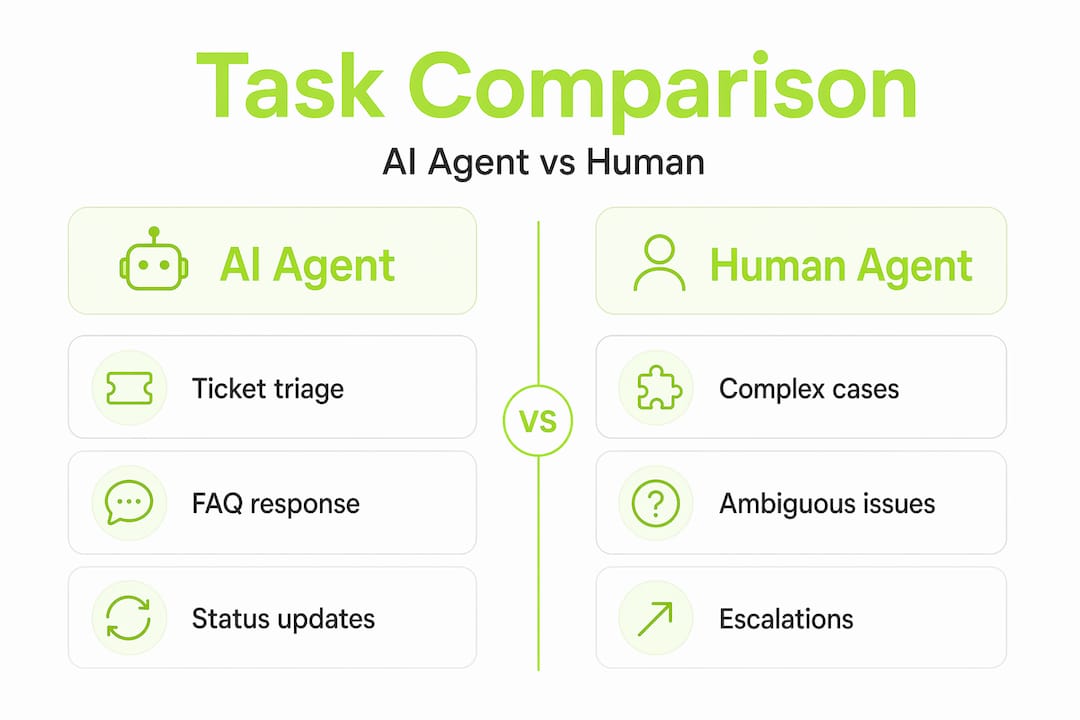
The tasks in the bottom half of that table are where your human agents need to live. When you're evaluating AI agent platforms, look at how they handle the building AI agents guidance around ambiguous cases. Many platforms are optimized for clean, well-structured tickets. Real support queues are messy.
Steps to identify which tasks are ready for AI automation in your specific product:
- Audit your ticket categories for the past 90 days. Sort by volume and average resolution time.
- Flag tickets that follow a script. If a human agent could resolve them with a decision tree, an AI can too.
- Identify tickets that require system access. AI can handle these if properly integrated with your backend.
- Pull tickets that resulted in escalation. These are not AI candidates yet.
- Review tickets with low CSAT scores. Understand whether the issue was complexity or knowledge gap before automating.
Pro Tip: When building your evaluation suite for AI agent testing, deliberately include ambiguous and incomplete tickets from your real queue. Most vendors demo on clean data. Your production environment is not clean data.
Reviewing your customer feedback tools setup before deploying AI is also worth doing. If your feedback collection is fragmented, your AI will be trained on incomplete signals and produce inconsistent results.
AI agent performance: Quality, measurement, and safe handoff
Deploying an AI agent is not a one-time event. It's an ongoing system that requires measurement, calibration, and continuous improvement. Teams that treat it as a set-and-forget tool end up with declining CSAT scores and frustrated customers who feel like they're talking to a wall.
The most common measurement mistake is optimizing for deflection rate alone. Deflection rate tells you how many tickets the AI closed without human involvement. It says nothing about whether those tickets were actually resolved correctly. A bot that confidently gives wrong answers will have a high deflection rate and a collapsing customer trust score.
That framing should anchor your entire measurement strategy. Resolution quality means the customer's problem was actually solved. Handoff accuracy means that when the AI couldn't solve the problem, it transferred to a human with full context, not a blank slate.
Key resolution accuracy metrics to track for AI support performance:
- Resolution rate: Percentage of tickets fully resolved by AI without escalation
- Escalation accuracy: Of tickets escalated, what percentage genuinely required human intervention
- Handoff context score: Did the human agent receive enough context to continue without re-asking the customer for information
- Bot CSAT vs human CSAT: Measure these separately to understand where the experience gap is
- First contact resolution (FCR): Was the issue resolved in a single interaction, regardless of whether AI or human handled it
- Time to resolution: Compare AI-handled tickets against human-handled tickets of the same category
- Knowledge gap rate: How often did the AI fail to find a relevant answer in its knowledge base
The knowledge gap rate is particularly important for SaaS products. Your product changes constantly. New features ship, old workflows change, pricing updates. If your AI is pulling from documentation that's six months old, it will give confident answers about features that no longer work the way it describes. This is one of the most damaging failure modes because customers don't realize the AI is wrong until they've already wasted time following bad instructions.
Common pitfalls that degrade AI support quality over time:
- Stale knowledge bases that aren't updated when the product changes
- Ambiguous ticket routing that sends complex issues to the AI when they should go straight to humans
- Missing escalation triggers that allow the AI to keep attempting resolution on tickets it's clearly failing
- No feedback loop between human agents and the AI system, so the AI never learns from its own failures
Following AI agent best practices around handoff design is essential. A good handoff includes the full conversation history, the AI's confidence score on its last response, and any relevant customer context pulled from your CRM.
Strategic adoption: Moving beyond simple automation
Most SaaS teams start their AI support journey by automating the obvious stuff: FAQs, ticket routing, status updates. That's the right starting point. But teams that stop there leave most of the value on the table.

Strategic AI adoption means thinking about what your human agents become, not just what they stop doing. Industry evidence consistently shows that organizations use AI to expand agent responsibilities rather than fully eliminate humans. The teams that get the most out of this shift are the ones that invest in upskilling in parallel with automation.
Steps to transition traditional support staff toward higher-value roles:
- Identify your top performers in escalation handling and knowledge creation. These are your models for the new role profile.
- Create a knowledge steward role responsible for auditing, updating, and expanding the content the AI uses. This is a full-time job in most SaaS companies.
- Train agents on AI oversight. They need to understand how to read AI performance dashboards, flag failure patterns, and submit corrections.
- Redesign your escalation workflow so that AI-to-human handoffs are seamless and context-rich, not jarring restarts.
- Build career paths that reward agents who develop expertise in AI management, not just ticket resolution speed.
- Pilot the new structure with a small team before rolling it out org-wide. Measure CSAT, resolution rate, and agent satisfaction before scaling.
Pro Tip: Focus your retraining resources on knowledge management and escalation handling first. These two skills have the highest leverage. An agent who can build and maintain a clean knowledge base directly improves AI performance for every customer interaction.
Exploring AI adoption in support solutions that integrate with your existing product workflows is worth prioritizing early. The more context your AI has about your actual product, the better it performs on real customer issues.
A hard lesson: Why "replacing" is the wrong framing
We've watched a lot of SaaS teams approach AI support with a cost-cutting lens. The pitch to leadership is simple: replace agents, reduce payroll, maintain coverage. It's a compelling financial argument. It's also the framing most likely to produce a failed rollout.
Here's what the cost-cutting framing misses. Support quality is not just a function of response time and deflection rate. It's a function of knowledge freshness, contextual accuracy, and the ability to handle the unexpected. AI agents are only as good as the content they're trained on and the workflows they're integrated into. When you eliminate the humans who maintain that content and those workflows, you're not saving money. You're removing the system's ability to self-correct.
Contradictory "right answers" often stem from stale documents and require robust knowledge lifecycle controls to prevent. This is not a minor technical footnote. It's the central operational challenge of running AI support at scale. Every time your product ships a change, every time your pricing updates, every time a known bug gets fixed, your knowledge base needs to reflect that reality. If it doesn't, your AI becomes a confident source of misinformation.
The teams that succeed with AI support are the ones that treat it as a product in its own right. They have owners, roadmaps, quality metrics, and improvement cycles. They understand that customer experience nuance cannot be fully encoded in a static document. They build evaluation suites that include the weird, ambiguous, edge-case tickets that don't fit any template.
Real transformation in support is gradual, iterative, and deeply dependent on human judgment at the knowledge layer. The goal is not to remove humans from support. The goal is to remove humans from the tasks that don't require human judgment, so they can focus entirely on the tasks that do.
Ready to scale your support? Unlock AI-powered workflow with Coevy
Putting these strategies into practice requires a platform that goes beyond simple chatbot automation. Coevy is built specifically for SaaS teams that need AI support to grow with their product, not against it.

Coevy's integrated widget captures user feedback, session replays, and AI-generated bug reproduction steps directly inside your web app, giving your support AI the contextual data it needs to perform accurately. Unlike documentation-based AI tools, Coevy's upcoming AI agent reads your actual codebase, so it answers questions tied to how your product actually works today, not how it worked six months ago. Auto-tagging, prioritization, and GDPR-compliant data handling make it a practical choice for teams serious about AI support solutions that scale responsibly.
Frequently asked questions
Is it possible to fully replace support staff with AI agents?
Most companies redesign roles and gradually reduce headcount rather than fully replacing staff in one step. Industry data shows that 85% of support leaders are expanding agent responsibilities, not eliminating them.
What support tasks are best handled by AI agents?
AI agents excel at automating ticket triage, routine resolutions, and FAQs, allowing humans to focus on complex cases. Human capacity shifts to higher-value roles as AI absorbs the predictable, high-volume work.
How should SaaS teams measure the effectiveness of AI agents in support?
Effectiveness is best measured by resolution quality, safe handoff to humans, and CSAT differences between bots and humans. Tracking resolution quality and handoff accuracy gives a far more complete picture than deflection rate alone.
What are the risks of automating support with AI agents?
Stale knowledge and ambiguity in documents can cause confident but incorrect answers, so teams need robust content controls. Contradictory answers from stale documents are one of the most common and damaging failure modes in production AI support systems.