A feedback collection workflow checklist is a step-by-step framework that ensures user insights move consistently from raw input to resolved action and clear communication. Without one, product teams collect feedback in scattered ways, miss patterns, and make decisions based on noise rather than signal. The most effective version of this process ties every stage directly to specific business decisions, assigns clear ownership, and closes the loop with customers. This article breaks down each stage of a structured feedback process checklist so your team can build one that actually ships features.
1. What belongs in a feedback collection workflow checklist
A feedback collection workflow checklist covers six core stages: intake, classification, triage, routing, action, and loop closure. Each stage has defined inputs, outputs, and owners. Teams that skip stages end up with a backlog of unread feedback and no clear path to decisions. Structured feedback loops with 4 to 6 stages, piloted on 3–5 strategic business decisions in recurring 6-week cycles, see feature-request shipping rates above 70%. That number shows what a defined process does that ad hoc collection cannot.
Every checklist also needs a strategic anchor. Feedback unrelated to strategic priorities should be discontinued to avoid "research theatre." Tie your workflow to 3–5 quarterly business decisions, and every item in your backlog earns its place.

2. Selecting and limiting your intake channels
Limiting feedback collection to 2–3 channels avoids survey fatigue and data fragmentation. Focusing on 2–3 channels like in-product widgets versus using 7 or more channels improves data quality and response rates. More channels create more noise, not more signal.
The three most productive channels for SaaS product teams are in-product widgets, direct user interviews, and support tickets. In-product widgets capture friction at the exact moment it happens, which gives you context that a follow-up survey never will. Direct interviews give you the "why" behind patterns. Support tickets surface recurring pain points that users did not bother to report elsewhere. AI interviewer agents compress time-to-insight from weeks to hours by capturing the reasoning behind scores automatically.
Pro Tip: Add a feedback widget directly inside your web app rather than linking to an external survey. The benefits of in-app collection include higher completion rates and richer contextual data attached automatically.
3. Standardizing your intake fields
Every submission must capture the same fields to make triage fast and consistent. Unified intake fields that include customer name, account, submission date, channel, request type, business impact, and owner responsible can drop triage cycle times from days to under an hour for bug fixes. That is the operational case for standardization.
The required fields for every intake form are:
- Customer name and account tier (distinguishes enterprise impact from individual edge cases)
- Submission date (tracks aging and urgency)
- Source channel (in-product widget, interview, support ticket)
- Issue or request summary (one sentence maximum)
- Business impact (what breaks or slows down if this is not addressed)
- Owner responsible (who submitted and who is accountable for follow-up)
Contextual metadata strengthens every submission. Pairing raw user input with account tier and recent behavior distinguishes systemic issues from noise. A bug reported by 40 enterprise accounts is a different priority than the same bug reported by 2 trial users.
4. Classifying and tagging feedback items
Classification turns raw submissions into sortable, comparable data. Use a limited tag taxonomy to keep it manageable: theme, type, journey stage, urgency, and customer value. Teams that build 50-tag taxonomies end up with inconsistent tagging and useless filters. Five dimensions cover the meaningful distinctions.
A practical scoring rubric with criteria like customer frequency, business impact, strategic fit, urgency, and effort confidence effectively prioritizes feedback without requiring complex scoring systems. Apply the rubric at the classification stage so every item enters triage with a score already attached.
Pro Tip: Use AI tagging tools to apply your taxonomy automatically at submission. This removes the manual bottleneck and keeps classification consistent across team members.
Merge duplicate submissions into consolidated problem statements before triage. One well-written problem statement supported by 15 data points is more useful to engineering than 15 separate tickets saying the same thing.
5. Running weekly triage and grouping sessions
Weekly triage meetings keep the backlog from aging into irrelevance. The meeting has one job: validate classifications, merge duplicates, and assign grouped items to decision owners. Keep it to 30 minutes with a fixed agenda.
The triage process follows four steps:
- Review new submissions from the past 7 days and confirm all required fields are complete.
- Validate tags against your taxonomy and correct any misclassifications.
- Merge duplicates into consolidated problem statements with all supporting evidence attached.
- Score and rank each group using your rubric, then assign a decision owner.
Strong problem statements include a concise description, the affected user segment, supporting evidence, business context, and success criteria. Engineering can then challenge the solution rather than the problem's validity. That shift saves significant back-and-forth in sprint planning.
6. Routing feedback to the right owners
Routing defines who acts on each item and by when. Every feedback item needs five roles filled: submitter, triage owner, decision owner, communications owner, and process owner. Leaving any role empty means the item stalls.
The routing logic by team looks like this:
- Product team: Feature requests, UX friction, and roadmap-relevant patterns
- Engineering: Bug reports with reproduction steps and session data attached
- Customer success: Account-specific issues and churn-risk signals
- Support: Known issues with workarounds available
- Marketing: Messaging gaps and positioning feedback
Visible statuses keep every stakeholder informed without requiring status meetings. Use six states: new, needs clarification, grouped, under review, planned, and released. Every status change requires a note explaining the reason. This prevents items from sitting in "under review" for weeks with no explanation.
| Status | Meaning | Required action |
|---|---|---|
| New | Submitted, not yet reviewed | Assign triage owner within 24 hours |
| Needs clarification | Missing required fields | Contact submitter within 48 hours |
| Grouped | Merged with related items | Link to consolidated problem statement |
| Under review | Decision owner evaluating | Add expected decision date |
| Planned | Scheduled for a sprint | Link to roadmap item |
| Released | Shipped and communicated | Trigger loop closure communication |
7. Closing the loop with customers
Closing the loop is the biggest driver of customer loyalty and retention, often more than the initial collection itself. Proactive loop closure turns passive users into advocates. Most teams invest heavily in collection and almost nothing in follow-up. That is where loyalty is actually built.
The service recovery paradox reinforces this point. Customers whose issues are acknowledged and resolved often develop stronger loyalty than those who never had issues at all. The act of closing the loop signals that the team listens and acts.
"You said, we did" messaging is the most effective format for loop closure. It connects the customer's specific input to a concrete product change, making their contribution visible and their loyalty earned rather than assumed.
Use three communication formats depending on the outcome:
- Personalized email for high-value accounts whose specific request shipped
- Changelog notice for broadly requested features now available to all users
- Lifecycle email for users who reported an issue that has since been resolved
Modular email templates automate loop closure communications and turn passive users into active advocates. Track your close-the-loop rate monthly. A rate below 60% signals that your workflow is collecting without acting.
8. Maintaining and auditing the workflow over time
A feedback process checklist degrades without regular maintenance. Set three review cadences: weekly triage, monthly pattern review, and quarterly process audit. Each serves a different purpose and catches different failure modes.
The quarterly audit checks five quality dimensions:
- Submission quality: Are required fields consistently complete?
- Duplicate control: Are similar items being merged before triage?
- Decision transparency: Does every item have a status note explaining its current state?
- Loop closure rate: What percentage of resolved items received customer follow-up?
- Repository hygiene: Are stale items older than 90 days archived or closed?
Regular scheduled audits sustain high-quality feedback management practices over time. Without them, teams accumulate a backlog of unclassified items and lose trust in the system.
Trigger a process update when any of these conditions occur: a new intake channel is added, ownership roles change, decisions consistently take more than two weeks, or a new tool replaces part of the workflow. Start with the simplest version of your checklist and add complexity only after the core stages run reliably.
| Review cadence | Focus area | Key question |
|---|---|---|
| Weekly | New submissions and triage | Are all items classified and owned? |
| Monthly | Patterns and priorities | What themes are growing in frequency? |
| Quarterly | Process and quality | Is the workflow producing decisions? |
Key takeaways
A structured feedback collection workflow checklist produces decisions, not just data. Every stage from intake to loop closure must have defined owners, standard fields, and visible statuses to function reliably.
| Point | Details |
|---|---|
| Limit intake channels | Use 2–3 channels to improve data quality and avoid fragmentation. |
| Standardize every submission | Capture customer info, business impact, and owner at intake to cut triage time. |
| Score before triage | Apply a rubric at classification so every item enters triage ranked and ready. |
| Assign five roles per item | Submitter, triage owner, decision owner, communications owner, and process owner prevent items from stalling. |
| Close the loop actively | Track your close-the-loop rate monthly; below 60% signals a systemic gap in follow-through. |
What I've learned from watching feedback workflows fail
Most feedback workflows fail at the same two points: classification and loop closure. Teams build intake forms carefully, then let submissions pile up in a spreadsheet with no owner and no status. The backlog becomes a graveyard, and the team stops trusting the process.
The fix is not a better tool. The fix is ownership. Every item needs a named human responsible for its next action. Without that, even the best-designed workflow stalls within a month. I have seen teams with sophisticated platforms produce worse outcomes than teams using a shared document with clear ownership rules.
The other failure I see constantly is treating loop closure as optional. It is not. The "you said, we did" message is where loyalty compounds. Customers who receive it become your most credible advocates. Customers who never hear back after submitting feedback become quietly resentful, even if their request was eventually shipped.
The teams that get this right share one habit: they tie every feedback item to a specific business decision before it enters triage. Feedback without a decision context is just noise with good intentions. When you force that connection early, the entire workflow gets faster and more focused. The customer feedback loop guide from Coevy covers this alignment in depth and is worth reading before you build your first triage session.
— Dizzy
How Coevy fits into your feedback workflow
Product teams that want to capture user friction at the exact moment it happens need a tool that works inside the product, not outside it.
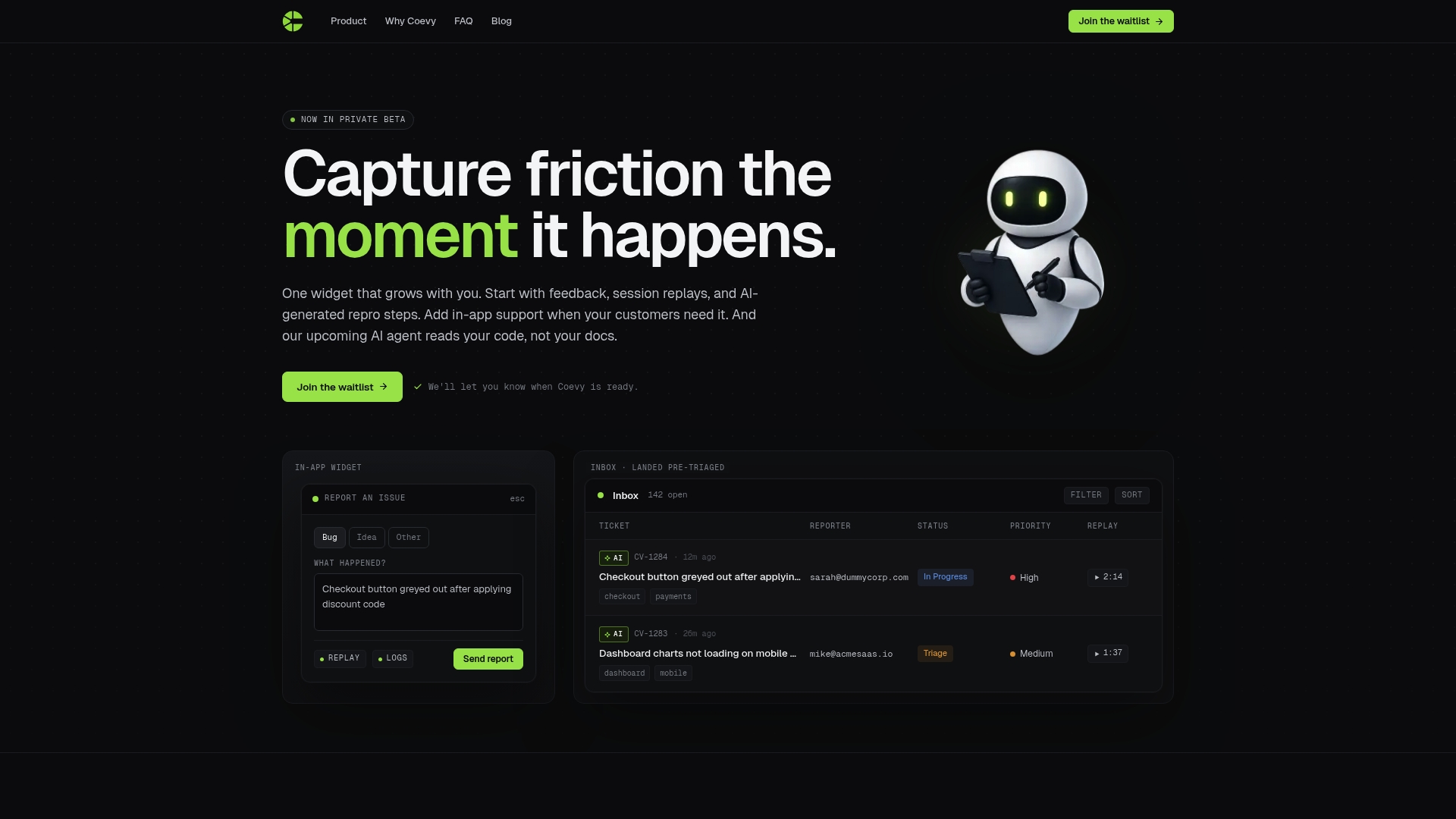
Coevy embeds directly into your web app as a single widget that collects feedback, attaches session replays automatically, and generates AI-powered reproduction steps for bugs. Your intake fields are pre-structured, your contextual metadata is captured without manual effort, and your triage team gets submissions that are already actionable. Coevy also handles AI-powered auto-tagging to classify submissions at the moment they arrive. Visit Coevy to see how the platform fits your existing workflow and what setup looks like for a SaaS team at your stage.
FAQ
What is a feedback collection workflow checklist?
A feedback collection workflow checklist is a structured process that guides product teams from intake through classification, routing, action, and customer follow-up. It defines required fields, ownership roles, and status rules at every stage.
How many feedback channels should a product team use?
Product teams should limit collection to 2–3 channels. Using more than that fragments data and reduces response quality without adding meaningful signal.
How often should teams run feedback triage?
Weekly triage sessions keep the backlog current and prevent items from aging past their relevance. Monthly pattern reviews and quarterly process audits complement the weekly cadence.
What does "closing the loop" mean in a feedback workflow?
Closing the loop means communicating back to the customer after their feedback has been reviewed or acted on. It is the single strongest driver of customer loyalty in a feedback process checklist.
How do you prioritize feedback items during triage?
Apply a scoring rubric at classification using criteria like customer frequency, business impact, strategic fit, urgency, and effort confidence. Items enter triage already ranked, which keeps the meeting focused on decisions rather than debate.