Manual code review is one of the most time-consuming, error-prone tasks your team faces. As codebases grow faster than headcount, the benefits of AI code reading tools become impossible to ignore. Bugs slip through, PR queues pile up, and senior engineers spend hours explaining context instead of shipping features. AI code reading tools are changing that equation, not by replacing developer judgment, but by handling the cognitive grunt work so your team can focus on what actually requires human thinking.
Table of Contents
- Key takeaways
- 1. The core benefits of AI code reading tools for code quality
- 2. Faster debugging through AI-assisted code reading
- 3. Better team collaboration and faster onboarding
- 4. Comparing AI code reading tools to traditional methods
- 5. How AI tools support improving coding efficiency
- 6. Practical tips for integrating AI code reading tools
- My honest take on where AI code reading tools fall short
- How Coevy takes AI code reading further
- FAQ
Key takeaways
| Point | Details |
|---|---|
| Early bug detection saves money | Fixing bugs at code review costs roughly 10x less than fixing them in production. |
| AI boosts productivity significantly | Over 80% of developers use AI tools daily, with some productivity gains reaching 94% on specific tasks. |
| Rules files multiply AI review value | Team-specific AI rules files can cut PR review time by up to one third. |
| Combine AI with static analysis | Pairing AI semantic analysis with deterministic tools like ESLint delivers better coverage with fewer false positives. |
| Track the real cost of AI validation | About 31% of developer effort goes to validating AI output, so measuring this "AI tax" is critical for accurate ROI. |
1. The core benefits of AI code reading tools for code quality
The most direct payoff from AI code reading tools shows up in code quality metrics. Traditional static analysis tools check syntax and rule violations. AI-powered tools go further: they understand context. They can spot that a function is technically correct but behaviorally wrong given how it will be called three layers up the stack.
Up to 85% of known vulnerabilities are detectable before deployment when automated analysis tools are integrated into the development pipeline. That number matters because the cost of remediation climbs steeply the longer a defect survives. Fixing bugs at review is roughly 10 times cheaper than fixing them in production.
What separates AI semantic analysis from pure rule-based checking is its ability to reason about intent. It can flag a SQL query that is technically valid but vulnerable to injection in a specific execution path. It can identify a race condition that only emerges under load. These are the bugs that escape grep-style static analyzers entirely.
Pro Tip: Run your rule-based static analyzer (ESLint, Semgrep) as a hard gate in CI, and reserve your AI tool for semantic PR review. You get deterministic enforcement plus context-aware insight without paying double the latency on every commit.
2. Faster debugging through AI-assisted code reading
Debugging unfamiliar code is cognitively expensive. You trace calls, infer intent, check git blame, and ask whoever wrote it what they were thinking. AI code reading tools compress that process significantly.

When a developer opens a bug report, an AI tool can scan the relevant code path, identify the likely root cause, and explain it in plain language. That is not a trivial time save. Over 80% of professional developers now use AI tools in daily workflows, with productivity improvements reaching 94% for specific tasks. Much of that gain comes from exactly this kind of accelerated code comprehension.
Automated PR review feedback is another concrete win. Instead of waiting 24 hours for a senior engineer to comment on a pull request, an AI tool provides instant feedback on logic errors, security gaps, and style violations. The human reviewer then handles the genuinely complex judgment calls, which is what they should be doing.
The advantages of code analysis tools become especially clear in incident response. When something breaks in production, speed matters. An AI tool that can read your codebase and immediately surface the most probable failure points cuts mean time to resolution in ways manual triage simply cannot match.
3. Better team collaboration and faster onboarding
New developers joining a large codebase face a steep ramp-up period. They need to understand not just what the code does, but why it was written that way. AI tools can generate plain-language walkthroughs of modules, explain architectural decisions captured in comments, and surface related code patterns. That accelerates onboarding in ways that written documentation rarely achieves, because the explanation is tied directly to the code being read.
For existing teams, consistency in PR feedback is a real problem. Different reviewers catch different things. One engineer flags naming conventions; another ignores them but catches edge cases. AI tools enforce consistent standards across every review, every time.
Team-specific rules files loaded by AI reviewers cut review time by up to one third and capture collective team knowledge. Here is how that typically works in practice:
- Your team documents its conventions in a structured rules file (AGENTS.md or similar).
- The AI reviewer ingests these rules before analyzing any pull request.
- Reviewers stop leaving the same comments repeatedly because the AI handles them automatically.
- Senior engineers review only the issues that require product judgment or architectural thinking.
"The goal isn't to replace the human reviewer. It's to make sure the human reviewer only sees the things a human actually needs to review."
This is one of the clearest automated code review benefits available right now. The cognitive load reduction for tech leads is real and measurable.
4. Comparing AI code reading tools to traditional methods
Understanding where AI tools outperform traditional methods, and where they do not, helps you deploy them correctly.
| Dimension | Traditional static analysis | AI code reading tools |
|---|---|---|
| Speed | Fast (seconds per file) | Moderate (seconds to minutes per PR) |
| Scope | Rule-based, deterministic | Semantic, context-aware |
| Bug types caught | Known patterns, syntax issues | Complex logic, context-dependent bugs |
| False positives | Low (predictable) | Can be higher without tuning |
| Human judgment replacement | Partial | Partial (different layer) |
| Onboarding support | None | Strong (code explanation, walkthroughs) |
Combining AI semantic analysis with rule-based tools delivers the best results. Rule-based tools like Semgrep or ESLint handle deterministic checks reliably. AI tools like CodeRabbit or Snyk Code handle the semantic layer. Neither replaces the other.
There is a real trade-off to acknowledge. 81% of engineering leaders report that developers are spending more time on manual review specifically because of AI-generated code. The AI writes faster than humans can verify. That validation overhead is a genuine cost.
AI alone is not sufficient. Human reviewers still handle complex design decisions, product tradeoffs, and architectural judgment. The honest framing is that AI handles volume and pattern recognition; humans handle meaning and consequence.
5. How AI tools support improving coding efficiency
Improving coding efficiency with AI is about more than writing code faster. It is about spending less time on work that does not require your expertise.
AI code reading tools contribute to efficiency in several distinct ways:
- Automated code summaries reduce the time developers spend understanding unfamiliar modules before making changes.
- Instant PR feedback removes the bottleneck of waiting for human reviewers to get to the queue.
- Pattern-based suggestions surface idiomatic improvements without requiring a senior engineer to catch them manually.
- Documentation generation tied to actual code rather than hand-maintained wikis stays accurate longer and reduces drift.
Incorporating AI as an integrated automation layer connecting PR reviews, QA, and documentation creates sustainable productivity improvements. One-off AI integrations give you a spike in output. Treating AI as connective tissue across your entire workflow compounds those gains over time.
The shift in developer roles is real. AI is reshaping developer responsibilities toward managing autonomous agents and integrating AI outputs, rather than writing every line manually. That is not a threat. It is a redefinition of where experienced developers add value.
6. Practical tips for integrating AI code reading tools
Getting value from AI-assisted programming tools requires deliberate adoption. Here is what actually works:
- Start with a living rules file. Document your team's conventions, anti-patterns, and architectural decisions in a file your AI reviewer can ingest. This is the single highest-leverage action for immediate, sustained improvement. See how rules files scale AI reviews across larger teams for more detail.
- Layer AI on top of static analysis. Do not replace your existing linters. Add AI semantic review on top of them. You get deterministic coverage plus contextual insight with no overlap in function.
- Measure the AI tax. Track how much time developers spend validating AI output. About 31% of developer effort already goes to this validation work. If that number grows without a corresponding drop in bug rates, the tool is not delivering ROI. Organizations that track specialized metrics like AI validation time accurately evaluate AI ROI beyond surface productivity numbers.
- Prevent dependency traps. Require developers to explain AI-flagged issues in their own words before merging. This keeps code comprehension skills sharp and prevents the accumulation of accepted-but-ununderstood fixes.
- Automate the repeatable. Use AI to generate first drafts of release notes, code documentation, and test stubs. Humans review and finalize. This is where AI assistance frees the most time without creating the most risk.
Pro Tip: Set a monthly review of your AI rules file as a recurring calendar event. Codebases evolve, and rules that were accurate six months ago may now generate noise. A stale rules file is worse than no rules file.
My honest take on where AI code reading tools fall short
I've spent time integrating AI code reading tools across different team setups, and here is the thing no vendor marketing mentions directly. The teams that see the biggest gains are the ones where senior developers still read code deeply. AI tools sharpen that practice. They surface issues faster, so the developer spends more time understanding why something is wrong and less time hunting where it is wrong.
The teams that struggle are the ones that treat AI output as final. I've seen developers merge fixes they cannot explain because the AI suggested them and the test suite passed. That works fine until it does not, and when it fails, nobody on the team understands the code well enough to debug it quickly.
AI can erode technical sovereignty when developers accept plausible but unchecked fixes. The latent bugs that creates are the hardest kind to find because they look intentional.
My advice: use AI code reading tools to read code faster and catch more issues earlier. Do not use them as a substitute for actually understanding what your codebase does. Code comprehension remains the senior skill that separates engineers who can own a system from engineers who can only maintain it. AI accelerates that skill when used well. It erodes it when used as a shortcut.
— Dizzy
How Coevy takes AI code reading further
If you're building a SaaS product and want AI that actually reads your codebase rather than guessing from documentation, Coevy is worth your time. Coevy's platform includes codebase-aware AI support that ingests your actual source code to deliver precise debugging help and issue resolution, not generic answers pulled from a knowledge base.
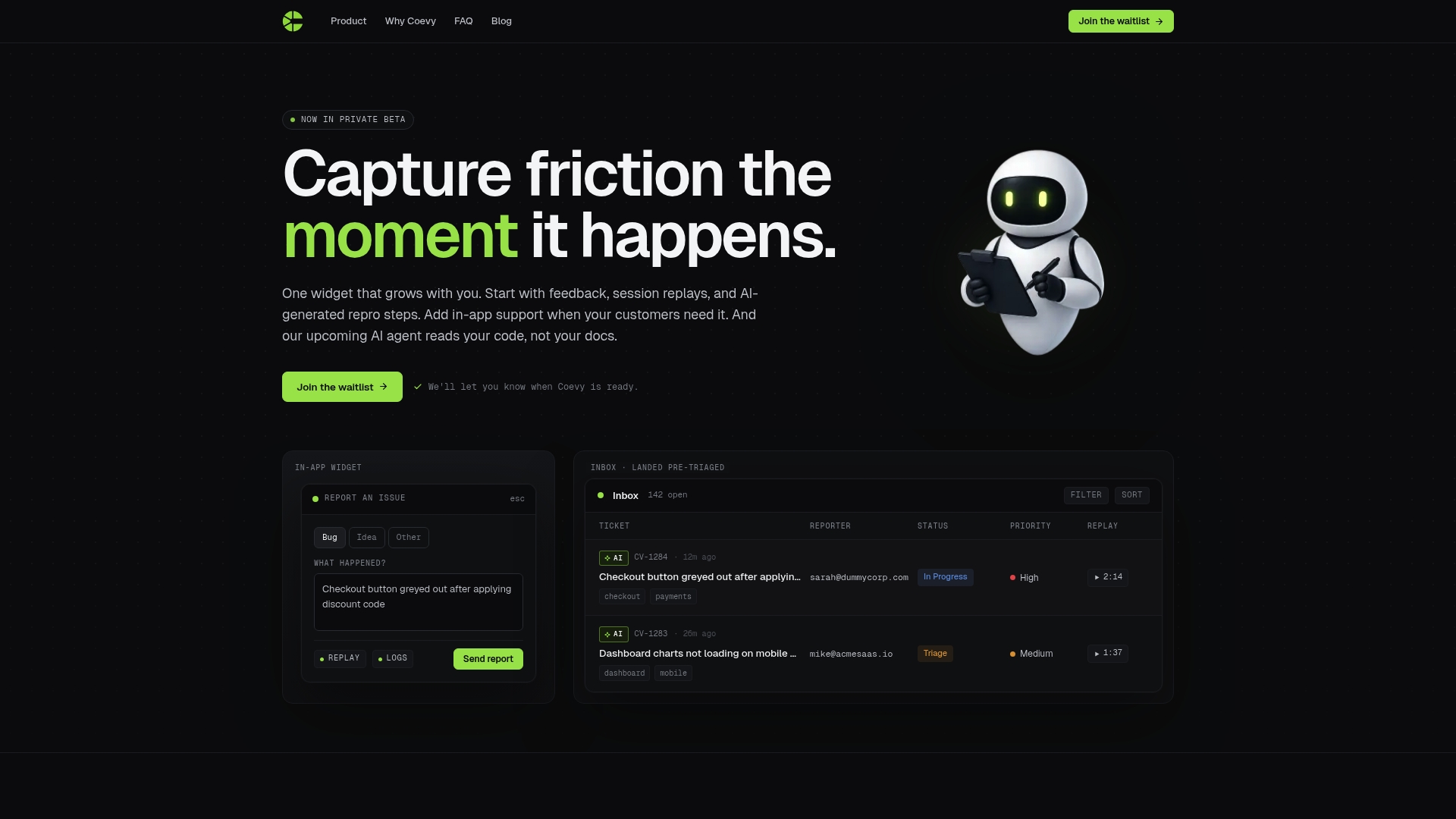
Coevy connects user feedback, session replays, and AI-generated bug reproduction steps directly to the code that caused them. That means less back-and-forth in bug resolution, faster triage, and support responses grounded in what the code actually does. For engineering teams that have outgrown basic support tooling, Coevy gives you a single platform that scales with your product and keeps your AI support accurate as your codebase evolves.
FAQ
What are the main benefits of AI code reading tools?
AI code reading tools detect security vulnerabilities and logic errors earlier in development, reduce PR review time, and help developers understand unfamiliar code faster. The biggest gains come from catching issues before they reach production, where remediation costs roughly 10 times more.
Do AI code reading tools replace human code review?
No. AI tools handle volume, pattern recognition, and deterministic feedback. Human reviewers still make architectural decisions, product tradeoffs, and judgments that require understanding business context. The two work best together.
How do AI code reading tools help with onboarding new developers?
AI tools generate plain-language explanations of modules, enforce team coding conventions automatically, and surface related patterns in the codebase. This compresses the time a new developer needs to become productive without requiring senior engineers to give repeated walkthroughs.
What is the risk of relying too heavily on AI code reading tools?
Over-reliance can create dependency traps where developers accept AI-suggested fixes without fully understanding them. This accumulates technical debt and makes future debugging harder. Requiring developers to explain AI-flagged issues before merging helps prevent this.
How do I measure whether an AI code reading tool is worth the cost?
Track bug rates before and after adoption, time spent on PR review, and the amount of developer time consumed validating AI output. If validation time grows without a corresponding drop in defect rates, the tool is generating more work than it saves.