Most SaaS product teams assume the AI-first customer support model is just automation layered on top of existing operations. Add a chatbot, deflect some tickets, call it done. That assumption is why so many teams get mediocre results. Understanding what is an AI-first customer support model means recognizing it as a complete redesign of how support works, where AI handles the majority of interactions by default and humans focus exclusively on cases that require real judgment. For early-stage SaaS startups trying to scale support without scaling headcount, this distinction is everything.
Table of Contents
- What is the AI-first customer support model?
- How AI and humans integrate in AI-first support
- Redesigning support operations for AI-first success
- Measuring and optimizing AI-first customer support performance
- Implementing AI-first customer support in SaaS startups
- Why successful AI-first support requires rethinking your entire support mindset
- Explore Coevy's tools to capture user friction and support AI-first operations
- Frequently asked questions
Key Takeaways
| Point | Details |
|---|---|
| AI-first means redesigning support | It positions AI as the primary handler of customer interactions, not just an assistant to humans. |
| Hybrid AI-human collaboration | AI handles routine tasks while humans focus on complex, empathetic support. |
| Operational transformation required | Success depends on redesigning workflows, data systems, and governance around AI capabilities. |
| Critical metrics for success | Monitor escalation rates, AI resolution, and customer effort to optimize performance continually. |
| Phased implementation approach | Start with simple cases, refine handoffs, then expand AI capabilities over 12-18 months. |
What is the AI-first customer support model?
The AI-first model starts with a simple but radical premise: AI is the first responder for every customer interaction, not a fallback or a filter. Traditional support operations are built around human agents who use tools to work faster. The AI-first model flips that. AI handles the full interaction unless it cannot, and humans are reserved for the exceptions.
This matters in practice because the two models produce completely different cost structures and customer experiences. In a traditional setup, every new support request adds labor cost. In an AI-first setup, volume growth does not automatically mean headcount growth. Organizations that fully redesign their model around AI achieve cost reductions of 30 to 45% while improving customer satisfaction scores. That combination is rare in operations work.
Here is what the AI-first model actually looks like in practice:
- AI as default handler: Every incoming request goes to AI first, regardless of channel.
- Confidence-based escalation: AI escalates to humans only when it falls below a confidence threshold or detects emotional signals.
- Human agents as exception specialists: Humans handle edge cases, complex complaints, and high-value relationship interactions.
- Continuous learning loops: Every resolved interaction, whether by AI or human, feeds back into the AI's knowledge base.
- Unified context layer: AI and human agents share the same interaction history, so nothing gets repeated.
Understanding the difference between customer service and experience helps clarify why this model matters. Service is transactional. Experience is cumulative. The AI-first model is designed to protect the experience even while automating the service.
| Dimension | Traditional model | AI-first model |
|---|---|---|
| Default handler | Human agent | AI agent |
| Scalability | Linear with headcount | Near-linear with compute |
| Cost per interaction | High and fixed | Low and variable |
| Human role | Primary responder | Exception handler |
| Learning mechanism | Training programs | Automated feedback loops |
| CSAT potential | High with good agents | Comparable with good AI design |
"An AI-first model is not about replacing people. It is about redesigning the system so that the right resource, human or AI, handles each interaction at the right cost and quality level."
How AI and humans integrate in AI-first support
The hybrid nature of AI-first support is where most implementations succeed or fail. Getting AI to handle 70% of tickets is achievable. Making the handoff to a human feel invisible to the customer is the hard part.

The best AI-driven support strategy is a hybrid model where AI handles repetitive tasks and humans focus on complex interactions, with AI-only customer satisfaction scores within 5 to 10% of human scores. That gap closes further when handoffs are designed well.
Here is how to design handoffs that actually work:
- Define escalation triggers precisely. Do not rely on generic rules like "unresolved after three turns." Use AI confidence scores, sentiment detection, topic classification, and explicit user requests as combined signals.
- Pass structured context, not raw transcripts. When a human agent picks up, they need a brief: what the customer wanted, what was tried, what failed, and the customer's current emotional state.
- Set expectations before the transfer. Customers tolerate handoffs much better when the AI says "I'm connecting you with a specialist who can resolve this" rather than silently passing them off.
- Track escalation rates by category. If password resets are escalating at 15%, something is wrong with the AI's handling of that flow, not with the customer.
- Give humans a way to push knowledge back. When a human resolves something the AI missed, that resolution should feed back into the AI's training data automatically.
Pro Tip: Integrate your customer feedback software directly with your AI's training pipeline. Every post-interaction survey response is a signal about where AI handling succeeded or broke down. Most teams collect this data and never connect it to AI improvement.
The escalation rate is your primary diagnostic. Too low (under 10%) and your AI is probably refusing to escalate cases it should not handle, frustrating customers. Too high (above 30%) and your AI is not resolving enough, which defeats the model's purpose entirely.
Redesigning support operations for AI-first success
Here is where most SaaS teams underestimate the work involved. Implementing an AI-first model is not a technology project. It is an operational transformation that touches data architecture, team structure, governance, and process design simultaneously.

Successful AI-first transformations anchor their vision to business outcomes, redesign work structure, and embed AI into workflows rather than layering it on top. That last phrase is the critical one. Layering AI on top of broken processes produces faster broken processes.
The four dimensions you need to align:
- Data architecture: Your AI is only as good as the data it can access. Support history, product documentation, user behavior data, and resolution outcomes all need to be structured and accessible.
- Process redesign: Map every support workflow and identify which steps AI can own, which require human judgment, and where the handoff points live.
- Human-AI integration: Define new human roles explicitly. Agents become reviewers, trainers, and exception handlers. This requires different hiring profiles and different performance metrics.
- Governance: Who owns AI quality? Who decides when an AI behavior is wrong? Without clear ownership, quality degrades silently.
The productivity benefits of AI are real, but they materialize only when the operational foundation is solid. Isolated pilots that prove AI can handle a specific ticket type do not translate into enterprise value without a phased roadmap.
| Maturity level | Description | Typical timeline |
|---|---|---|
| Level 1: Augmentation | AI assists human agents with suggestions | 0 to 3 months |
| Level 2: Automation | AI handles defined high-volume cases end to end | 3 to 9 months |
| Level 3: AI-first | AI is default handler with structured human escalation | 9 to 18 months |
| Level 4: Proactive | AI anticipates issues and reaches out before tickets form | 18+ months |
Pro Tip: Build your quality control loop before you scale AI coverage. It is far easier to catch AI errors when you are handling 500 tickets a day than when you are handling 5,000. Establish review sampling rates, error classification, and correction workflows early.
For deeper thinking on how these principles apply to your product, the Coevy blog covers AI-first support strategy insights worth bookmarking.
Measuring and optimizing AI-first customer support performance
Traditional support metrics like average handle time and first response time still matter, but they do not tell you whether your AI-first model is actually working. You need a parallel set of metrics built specifically for AI-driven support.
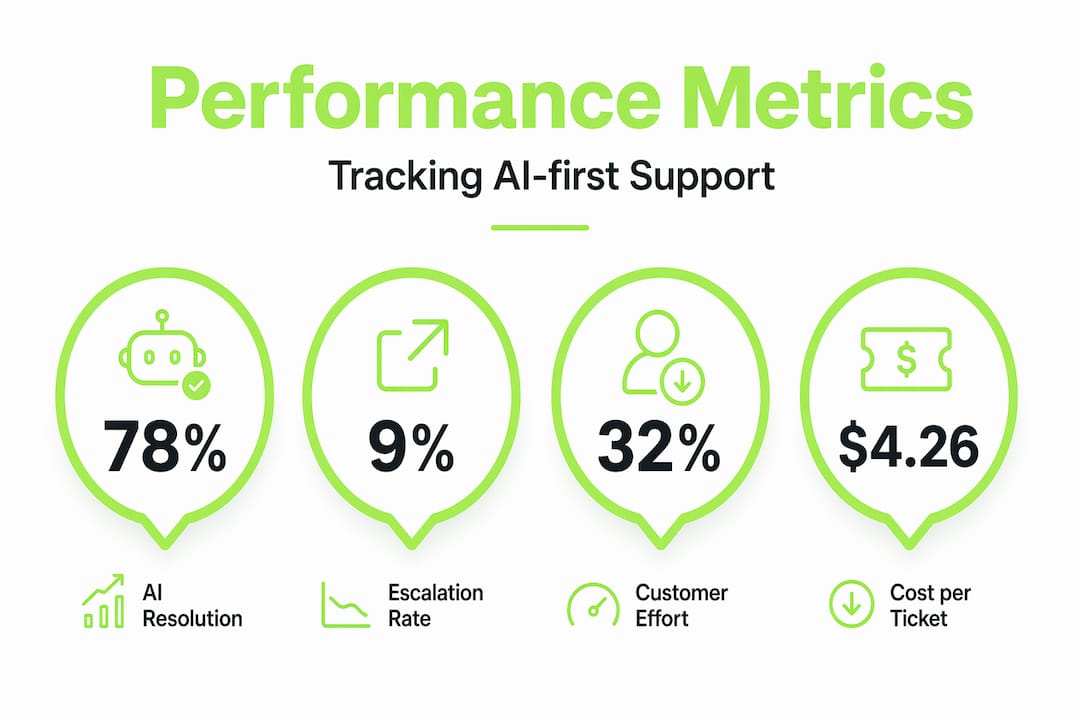
Escalation rates below 10% or above 20 to 30% indicate poor calibration. Dynamic monitoring helps tune AI confidence and reviewer capacity. Think of escalation rate as the thermostat reading for your entire AI-first system.
The metrics that matter most:
- AI resolution rate: What percentage of interactions does AI resolve without human involvement? Track this by ticket category, not just overall.
- Escalation quality score: When AI escalates, is it escalating the right cases? Rate escalations as necessary or unnecessary based on human agent review.
- Customer effort score (CES): How hard did the customer have to work to get their answer? AI-first models should reduce effort, not just reduce cost.
- Cost per resolved outcome: Not cost per ticket, but cost per resolved ticket. An AI that closes tickets without solving problems inflates resolution rate while destroying CES.
- AI improvement velocity: How fast is your AI getting better? Measure the rate at which previously escalated categories become AI-resolvable over time.
Pro Tip: Set up a weekly review of your top 10 escalation categories. These are your AI's biggest gaps and your highest-value improvement opportunities. Fixing one high-volume escalation category often has more impact than a broad model retraining.
Tracking customer service metrics alongside AI-specific KPIs gives you the balanced view needed to avoid optimizing for the wrong outcomes.
Implementing AI-first customer support in SaaS startups
Early-stage SaaS teams have one advantage that enterprise companies do not: you can build AI-first from the start rather than retrofitting it onto legacy operations. That advantage disappears quickly if you try to do everything at once.
Phase one focuses on automating high-frequency, low-complexity cases. Phase two refines handoffs. Phase three adds proactive AI-driven outreach. That sequence exists for a reason. Each phase generates the operational learning that makes the next phase possible.
Here is a practical implementation sequence for SaaS product teams:
- Audit your ticket volume by type. Identify the top five ticket categories by volume. These are your phase one automation targets.
- Build your knowledge base before your AI. AI quality depends entirely on the quality of the information it can access. Document your product thoroughly before you train anything.
- Define escalation triggers for each category. Different ticket types need different escalation logic. A billing dispute needs different triggers than a feature question.
- Run AI alongside humans for 30 days. Let AI suggest responses that humans review and send. This builds training data and catches errors before AI goes fully autonomous.
- Measure, adjust, then expand coverage. Only move to new ticket categories after your current AI coverage is performing at target metrics.
- Integrate user feedback into your AI pipeline. Every piece of user feedback you capture should connect back to your AI's knowledge base and improvement cycle.
Key tooling considerations for early-stage teams:
- Choose platforms that support structured handoffs, not just ticket routing.
- Prioritize tools that attach session context automatically to support tickets.
- Look for built-in feedback loops between resolved tickets and AI training data.
- Verify GDPR compliance before you collect any session or behavioral data.
Pro Tip: Do not wait until your support volume is painful to start building AI-first infrastructure. The best time to design your AI-first support system is when ticket volume is low enough that you can review every escalation manually and build genuinely good training data.
Why successful AI-first support requires rethinking your entire support mindset
Here is the uncomfortable truth most AI implementation guides skip: the technology is the easy part.
The hard part is convincing your team that support is no longer a labor management problem. The shift from workforce management to service system management changes leadership mindset from headcount optimization to orchestrating hybrid AI-human systems. That is a fundamentally different job.
Support leaders who succeed with AI-first models stop asking "how many agents do I need?" and start asking "what does my AI need to perform well?" Those are completely different questions that lead to completely different organizational decisions.
Human roles do not disappear in this model. They evolve. Your best support agents become knowledge engineers, AI trainers, and exception handlers. That is actually a more interesting job than answering the same password reset question 40 times a day. But it requires deliberate role design and honest conversations about what skills matter now.
The real competitive edge in AI-first support does not come from which AI model you use. It comes from the quality of your knowledge base, the precision of your escalation design, and the rigor of your feedback loops. Those are human-designed systems. Companies that invest in building strong feedback infrastructure before scaling AI coverage consistently outperform those that treat AI as a plug-and-play solution.
Traditional KPIs become misleading fast. A team that measures success by ticket closure rate will train their AI to close tickets, not solve problems. New metrics, new incentive structures, and new team designs are not optional extras. They are the foundation.
Pro Tip: Invest in support culture and process design before you invest in AI technology. The teams that fail at AI-first support almost always have the same problem: they bought the technology before they redesigned the work.
Explore Coevy's tools to capture user friction and support AI-first operations
Building an AI-first support model requires more than a smart AI. It requires real-time visibility into where users struggle, what they report, and how those signals connect back to your product and support workflows.

Coevy gives SaaS product teams exactly that. The platform captures user friction in real time through an embedded widget that attaches session replays, AI-generated bug reproduction steps, and contextual data directly to support tickets. No more back-and-forth asking users to describe what happened. Every issue arrives with the context your AI and human agents need to resolve it fast. Coevy integrates with key helpdesk platforms to support clean AI-human handoffs, and its auto-tagging and prioritization features feed directly into the kind of structured data pipelines that make AI-first support actually work. If you are building AI-first support from the ground up, Coevy is worth exploring early.
Frequently asked questions
What exactly does AI-first customer support mean?
AI-first customer support redesigns service operations so AI handles most interactions by default, with humans stepping in only for complex cases requiring judgment or empathy.
Do AI-first models replace human support agents completely?
No. The best approach is a hybrid model where AI handles repetitive tasks and humans focus on complex situations, with seamless handoffs preserving customer satisfaction.
How long does it take for a SaaS startup to implement AI-first support?
A meaningful first phase can be operational in 60 to 90 days, while full transformation typically takes 12 to 18 months depending on data readiness and team capacity.
What are key metrics to track in AI-first customer support?
Focus on AI resolution rate, escalation quality, customer effort reduction, and cost per resolved outcome to measure effectiveness and guide continuous improvement.
How can SaaS product teams improve the AI-human handoff experience?
A well-designed handoff flow preserves context, sets clear expectations with the customer, and equips the human agent with a structured summary of what the AI already attempted.