
Most small business owners think an AI chatbot is just a pop-up box that answers "What are your hours?" It isn't. Understanding what is an AI chatbot for small products means recognizing a tool that can handle order tracking, qualify leads, schedule appointments, and file support tickets while you sleep. If you sell a small product line and rely on email or a single support rep to manage customer questions, you're leaving real money and customer trust on the table. This article breaks down exactly what AI chatbots are, how they work, and how to deploy one without wasting your budget.
Table of Contents
- Key Takeaways
- What is an AI chatbot for small products
- Benefits and use cases for small product businesses
- How AI chatbots work in your day-to-day operations
- Cost considerations and how to choose the right solution
- What the near future looks like for AI chatbots
- My honest take on deploying AI chatbots
- How Coevy can help you get started
- FAQ
Key Takeaways
| Point | Details |
|---|---|
| AI chatbots go beyond FAQs | Modern AI chatbots handle lead qualification, order inquiries, and complex multi-turn conversations. |
| Ticket volume drops fast | Well-deployed chatbots reduce support ticket volume by 40 to 70% in the first month. |
| Cost transparency matters | Standard plans run free to $50/month; watch for hidden per-resolution fees that compound over time. |
| Human escalation is non-negotiable | 80% of customers want a visible path to a live agent when the AI cannot resolve their issue. |
| Treat it as a living system | Chatbots require regular retraining, data updates, and human oversight to stay effective. |
What is an AI chatbot for small products
An AI chatbot is a software program that uses artificial intelligence to simulate a human conversation in text or voice. When a customer types "Where is my order?" into your product page, the chatbot doesn't match keywords against a script. It uses natural language processing (NLP) to understand the intent behind the message, then pulls the relevant order data and replies in plain language. That distinction matters more than most people realize.
There are two fundamentally different types of chatbots. Scripted (or rule-based) bots follow decision trees. You write the question, you write the answer, and any variation confuses the bot. AI-driven chatbots are built on machine learning models that recognize patterns in language. They understand "My package hasn't shown up" and "Still no delivery" as the same question, even though the wording is completely different.
Here is what the technology stack looks like for a modern AI chatbot:
- Natural Language Processing (NLP): Converts raw text into structured data the AI can act on.
- Machine learning model: Trained on large datasets of conversations, product data, and support tickets to recognize intent.
- Dialog management: Tracks the full context of a conversation across multiple turns so the bot doesn't forget what was said two messages ago.
- Integration layer: Connects to your CRM, inventory system, or order management platform to fetch and update real data.
- Escalation logic: Detects when confidence is low or the customer is frustrated, then routes to a human agent.
The "learning" part is worth explaining directly. Most off-the-shelf AI chatbots don't retrain themselves automatically. You improve them by reviewing failed conversations, adding better training examples, and feeding them updated product information. Think of the AI as genuinely smart but only as knowledgeable as the data you give it.
Benefits and use cases for small product businesses
The misconception that AI chatbots are just simple Q&A tools stops a lot of entrepreneurs from realizing how much operational weight these tools can carry. For a small business selling physical or digital products, the most practical use cases are often unglamorous but high-volume.

Consider a store selling three to fifteen SKUs. The most common customer questions are usually: Is this in stock? When will it ship? Can I return it? What is the difference between product A and product B? A well-configured AI chatbot handles every single one of those without a human touching the keyboard. You get 24/7 customer support coverage without hiring a second rep.
Here is where the real value shows up for small product lines:
- Order tracking and status updates: Connect the chatbot to your fulfillment system and it answers shipping questions automatically, around the clock.
- Product comparison: Train the bot on your catalog and it walks customers through feature differences, reducing purchase hesitation.
- Return and refund initiation: The bot collects the order number, reason, and preferred resolution, then creates a ticket for your team to action.
- Lead qualification: If you sell B2B products or high-ticket items, the chatbot asks qualifying questions before routing to sales. You can use AI for lead generation without a full sales team on standby.
- Appointment or consultation booking: Useful for product demos or onboarding calls with new customers.
Beyond customer-facing functions, AI chatbots serve internal needs too. Pulling inventory reports, checking outstanding orders, or flagging low-stock alerts are tasks a well-integrated bot handles in seconds.
Pro Tip: Start with your three most common support questions and build the chatbot around those first. A bot that handles 80% of your real ticket volume beats a complex bot that handles every hypothetical scenario but confuses customers on the basics.
How AI chatbots work in your day-to-day operations
Understanding how AI chatbots work in practice requires separating two layers: the AI's ability to understand language and the automation layer that actually does things. The AI can understand "Please cancel my order," but it cannot cancel the order unless it is connected to your order management system with the right permissions. This is the distinction that trips up most first-time deployers.
Here is how a practical chatbot deployment for a small product business typically flows:
- Define the top workflows you want to automate. Common starting points are order status, return requests, and product FAQs.
- Connect your tools. Modern platforms integrate with existing tools like QuickBooks, PayPal, and HubSpot through pre-built connectors. You don't need a developer for most of them.
- Train on your specific data. Upload your product catalog, FAQ document, return policy, and past support tickets. The quality of this data directly determines how accurate the bot is.
- Set escalation triggers. Define when the bot hands off to a human: after two failed attempts to answer, when the customer uses frustration phrases, or on any billing issue.
- Test with real scenarios. Run through 20 to 30 real customer questions before going live. You will catch gaps you didn't expect.
- Monitor and retrain. Review flagged conversations weekly for the first 90 days. This is where most of the quality improvement happens.
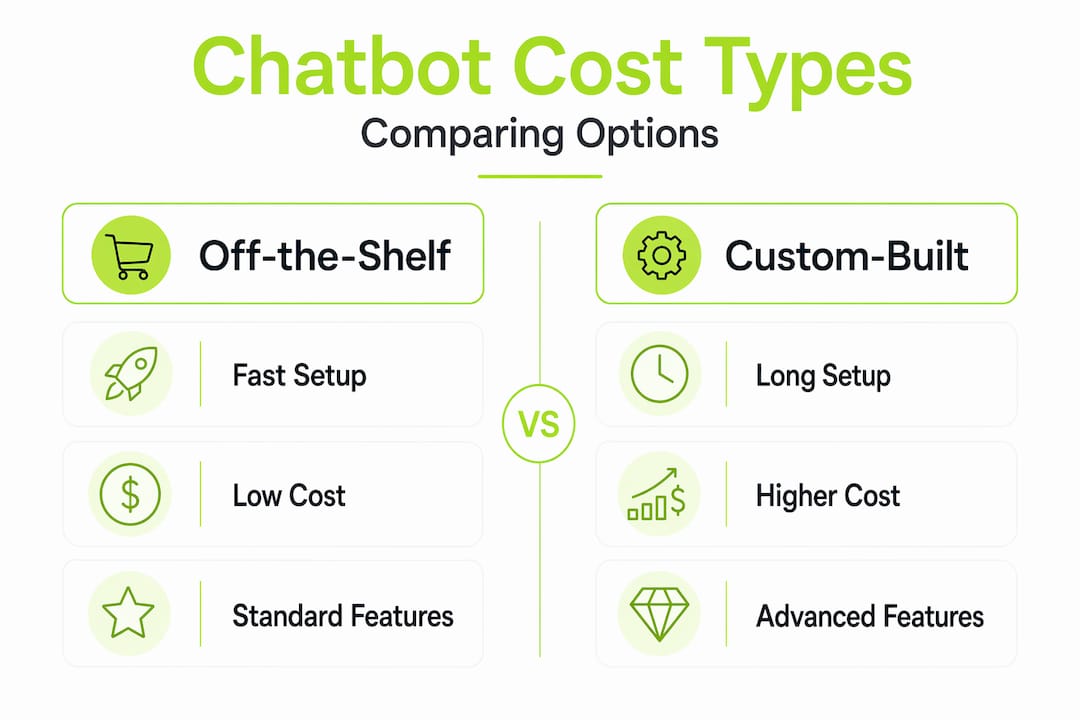
The table below compares the two main approaches to getting a chatbot set up:
| Approach | Setup time | Cost range | Best for |
|---|---|---|---|
| Off-the-shelf platform | 1 to 5 days | Free to $95/month | Small teams, standard workflows |
| Custom-built chatbot | 4 to 12 weeks | $5,000 and up | Complex workflows, unique integrations |
For nearly every small product business, off-the-shelf is the right call. Custom builds make sense only when your workflows are genuinely unique and cannot be handled by existing platform logic.
Pro Tip: Treating your chatbot as a living system that requires regular training is the most underrated deployment practice. Set a monthly calendar reminder to review the conversations the bot couldn't resolve and improve from there.
Cost considerations and how to choose the right solution
Pricing for AI chatbots is more transparent than it used to be, but hidden costs still catch small businesses off guard. Standard plans run from free to $50/month, which covers most small product businesses comfortably. Enterprise pricing above $200/month is generally unnecessary unless you're managing support for a team of 50 or more.
The number to watch is not the monthly subscription fee. It is the total cost of ownership across 18 months, which includes per-resolution fees, usage caps, add-ons for integrations, and what happens to your pricing when your conversation volume doubles. Some platforms charge per conversation resolved, which seems reasonable at low volume but scales painfully as you grow.
Here is what to audit before committing to any platform:
- Per-resolution or per-conversation fees: These can triple your effective monthly cost during busy seasons.
- Integration costs: Some platforms charge extra to connect Shopify, Stripe, or your email platform.
- Training data limits: A few providers cap how much custom data you can upload on standard plans.
- Human handoff availability: Live agent routing is sometimes a paid add-on, not a default feature.
- Contract length: Monthly billing gives you flexibility to switch if the tool isn't performing.
Measuring whether your chatbot is working is straightforward. Track ticket deflection rate (what percentage of conversations were fully resolved without a human), customer satisfaction scores on chatbot interactions, and average response time. If your deflection rate is below 40% after 90 days, the training data needs work.
The most common pitfall is the "set it and forget it" approach. Successful chatbot deployment requires ongoing oversight, not a one-time setup. The businesses that get the best results treat their chatbot as a team member that needs regular coaching, not a piece of infrastructure that runs itself.
What the near future looks like for AI chatbots
The AI chatbots launching in 2025 and 2026 are meaningfully different from what was available two years ago. The shift is toward agentic behavior. Instead of answering questions, agentic AI chatbots orchestrate actions across multiple tools in a single conversation. A customer says "I need to return this and reorder in a different size," and the bot processes the return, checks inventory, places the new order, and sends a confirmation email without human involvement.
For small product businesses, this matters for several reasons:
- Back-office automation: AI handles expense tracking, inventory alerts, and supplier communication, not just customer-facing tasks.
- Multi-language support: Newer models handle 40 or more languages with near-native fluency, opening international markets without hiring multilingual staff.
- Personalization at scale: Chatbots pull purchase history to make product recommendations that feel specific to each customer, not generic.
- Marketing workflow automation: Follow-up sequences, review requests, and abandoned cart recovery can all be triggered and managed by AI agents.
- Scaling without headcount: AI support scales with your product as volume grows, so you're not forced to hire proportionally.
The businesses that build AI fluency now, including knowing which workflows to automate and which to keep human, will have a structural advantage within the next two years.
My honest take on deploying AI chatbots
I've watched a lot of small business owners go into AI chatbot projects with unrealistic expectations in both directions. Some think the bot will replace their entire support operation on day one. Others are so skeptical they never try it at all and keep paying for support hours that could be automated.
What I've found in practice is that the results are real but proportional to the work you put in upfront. The businesses I've seen get the best returns are the ones that did two things well: they defined clear escalation triggers from day one, and they audited failed conversations every single week for the first three months.
The human role doesn't disappear. AI should ease the work, not eliminate your team. The customers who have a genuinely bad chatbot experience are almost always ones where the escalation path was broken or invisible. Getting clear human escalation right isn't optional, it's the difference between a chatbot that builds loyalty and one that drives people to your competitors.
My strongest advice: don't try to automate everything at once. Pick one workflow, get it right, measure the result, and expand from there. Incremental wins compound faster than ambitious overbuilds that fall apart in production.
— Dizzy
How Coevy can help you get started
If you're building or running a software product and want AI-powered support that goes beyond chatbot basics, Coevy is worth a serious look.

Coevy is a SaaS platform that unifies customer feedback, bug reporting, and AI-first customer support inside a single embedded widget. Unlike generic chatbot tools, Coevy's AI reads your actual codebase, which means it gives customers and your team accurate answers tied to how your product actually works. Not documentation that's six months out of date. Auto-tagging, session replays, and codebase-aware assistance come built in from day one. If you want to see how scalable, context-aware support works in practice, explore Coevy and start without a sales call.
FAQ
What is an AI chatbot for small product businesses?
An AI chatbot for small product businesses is a software tool that uses natural language processing to handle customer conversations automatically, including order tracking, returns, product questions, and lead qualification, without a human rep involved for routine requests.
How much do AI chatbots cost for small businesses?
Most small businesses pay between free and $50/month for a standard AI chatbot plan. Enterprise pricing above $200/month is generally unnecessary for teams under 50 employees, but watch for per-resolution fees that add up as volume grows.
How do AI chatbots improve small product customer service?
AI chatbots provide 24/7 responses, resolve repetitive questions instantly, and can reduce support ticket volume by 40 to 70% in the first month, freeing your team to focus on complex customer issues that actually need human judgment.
Do AI chatbots need human oversight?
Yes. The most effective chatbot deployments include regular retraining on new data, weekly reviews of unresolved conversations, and clear escalation paths to live agents. A chatbot without human oversight degrades in quality over time.
When should a small business use a custom-built chatbot versus an off-the-shelf platform?
Off-the-shelf platforms work for the vast majority of small product businesses and deploy in one to five days at a fraction of the cost. Custom builds are only justified when your workflows are genuinely unique and cannot be configured within an existing platform's logic.