AI-assisted code debugging is a method where large language models (LLMs) analyze error messages, stack traces, and project code to generate hypotheses about bug causes and propose fixes that developers then verify with traditional tools. The industry term for this practice is LLM-augmented debugging, though "AI-assisted debugging" is the phrase most developers search for and use in practice. Tools like Claude Code and workflows built on retrieval-augmented generation (RAG) have made this approach practical for everyday engineering. The core promise is speed: AI narrows the search space so you spend less time guessing and more time confirming.
What is AI-assisted code debugging, explained step by step?
AI-assisted debugging works by feeding an LLM the artifacts it needs to reason about a failure. Developers paste stack traces, error messages, and relevant code snippets into the model, then ask it to generate multiple hypotheses about what went wrong. The model does not run your code or observe runtime state. It reasons over text, which means the quality of what you give it directly determines the quality of what you get back.
The LLM's job is hypothesis generation, not diagnosis. It might return three or four candidate causes ranked by plausibility, each with a suggested fix. You then take those candidates to your actual runtime environment and confirm or eliminate them using breakpoints, logging, and unit tests. Combining AI hypothesis generation with developer-driven runtime verification is what makes the approach faster than either method alone.

One detail that surprises many engineers: AI-assisted debugging is most valuable not when you already understand the bug, but when you are staring at an unfamiliar codebase or a stack trace that crosses five modules you did not write. The model can reason across file boundaries faster than you can manually trace call graphs. That cross-file reasoning is where the real time savings accumulate.
How does AI-assisted debugging work in practice?
The workflow has four concrete stages. Follow them in order and you will get reliable results. Skip stages and you will get plausible-sounding nonsense.
- Reproduce the bug locally. AI cannot help you debug a ghost. Confirm the failure is consistent before involving any tool.
- Assemble your input artifacts. Collect the full stack trace, the exact error message, the relevant code files or functions, and any environment details (Node version, framework version, OS). Feeding LLMs the literal stack trace together with relevant code dramatically improves first-pass accuracy. Vague prompts produce generic or hallucinated fixes.
- Request multiple hypotheses. Ask the model to give you three to five candidate causes, not just one. This forces it to reason more broadly and gives you a ranked list to test against evidence.
- Validate with traditional tools. Set breakpoints in your IDE, add targeted log statements, run existing tests, and write new ones if needed. The AI suggestion is a lead, not a verdict.
Autonomous agents like Claude Code narrow probable causes by reading project files and running shell commands, but they still require developer confirmation via breakpoints and logs. Autonomy speeds up the hypothesis phase. It does not replace runtime inspection.
Pro Tip: Structure your prompt as a mini bug report: "Given this stack trace [paste], this error message [paste], and this function [paste], give me three hypotheses for the root cause, ordered by likelihood, with a minimal fix for each." This format consistently produces more targeted responses than open-ended questions.
What are the advantages and limitations of AI debugging vs. traditional methods?
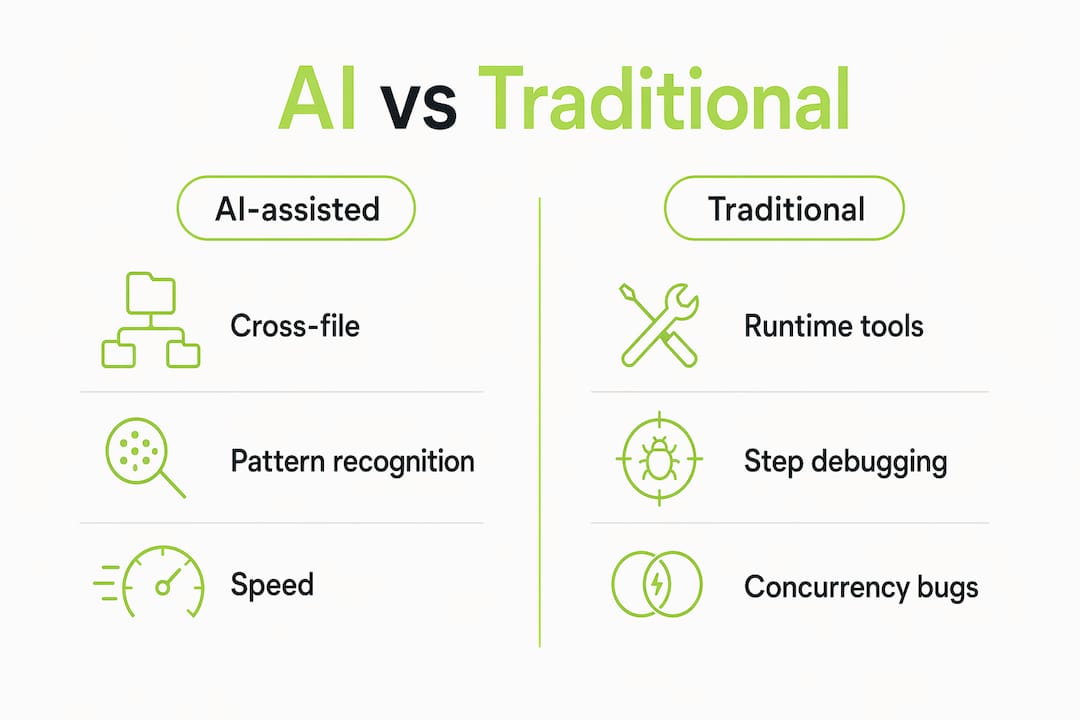
AI-assisted debugging and traditional debugging are not competing approaches. They cover different parts of the problem space.
Where AI has a clear edge:
- Cross-file and cross-module reasoning at speed, especially in large or unfamiliar codebases
- Pattern recognition across common bug categories (null pointer errors, async race conditions, misconfigured middleware)
- Explaining why a bug exists, not just where it is, which accelerates understanding for junior engineers
- Handling AI-generated code with hidden assumptions that cause subtle bugs, like socket exhaustion from creating a new HTTP client per call
Where traditional debugging is still necessary:
- Concurrency and distributed system bugs that require runtime instrumentation to observe
- Production failures where live state, memory dumps, or network traces are the only evidence
- Any bug where the fix requires understanding system behavior that is not visible in source code alone
| Capability | AI-assisted debugging | Traditional debugging |
|---|---|---|
| Cross-file reasoning | Strong, fast | Slow, manual |
| Runtime state observation | Not possible | Full access via breakpoints |
| Concurrency bug diagnosis | Weak without instrumentation | Strong with profilers and logs |
| Unfamiliar codebase speed | High | Low |
| Hallucination risk | Present, requires validation | None |
| Regression prevention | Possible via eval gating | Manual test writing |
LLMs are weaker on concurrency and distributed bugs that lack runtime instrumentation. This is not a flaw to work around. It is a boundary to respect. Use AI for hypothesis generation and pattern recognition. Use profilers, distributed tracing tools, and logs for anything involving timing, state, or network behavior.
What technical approaches enhance AI debugging accuracy?
The gap between a useful AI debugging tool and a frustrating one comes down to how well the system grounds its answers in your actual code. Three techniques separate reliable implementations from unreliable ones.
Retrieval-augmented generation (RAG) is the most important. RAG uses vector similarity search to fetch code chunks relevant to a debugging query before prompting the LLM. Instead of asking the model to reason from memory or from a manually pasted snippet, the system embeds your question, searches a vector index of your codebase, retrieves the most semantically relevant files, and then sends those files as context. The result is answers grounded in your actual source code rather than generic patterns. Coevy's upcoming AI agent takes this approach by reading real codebases rather than relying on documentation.
Verification layers add a second check after the LLM responds. Deterministic AST-based code analysis can confirm or reject diagnostic claims before you act on them. If the model claims a function is called with the wrong argument type, a static analysis pass can verify whether that claim is structurally true. This filters hallucinations before they reach your editor.
Automated eval gating converts debugging from a reactive activity into a prevention strategy. Braintrust's approach converts failures into regression tests that run on every pull request, blocking merges when automated quality scores drop below a threshold. This means a bug caught once is permanently encoded as a guard against recurrence.
Pro Tip: Context window size is not always your friend. Dumping an entire codebase into a prompt introduces noise that degrades answer quality. Use semantic indexing to retrieve only the three to five most relevant files. Precision beats volume.
Codebase-aware AI debugging indexes source files into vector databases and retrieves semantically relevant code automatically. This is the architecture that makes AI debugging practical at scale, not just for small scripts or isolated functions.
How can developers integrate AI debugging into their daily workflow?
Workflow integration is where most engineers either get real value or waste time. The difference is discipline around how you treat AI output.
- Reproduce before you prompt. A bug you cannot reproduce locally is a bug you cannot verify a fix for. Reproduction is the prerequisite for everything else.
- Treat every AI suggestion as a hypothesis. Maintaining human ownership over the debugging loop prevents over-trusting AI and builds better engineering habits. The model is a fast research assistant, not an authority.
- Request multiple candidates. Ask for three to five hypotheses per session. Testing a ranked list is faster than iterating on a single suggestion that turns out to be wrong.
- Verify with logs, tests, and DevTools. Apply the smallest explainable change that addresses the confirmed root cause. Do not apply a fix you cannot explain.
- Write a regression test before closing the ticket. This is the step most engineers skip. Scalable AI-assisted debugging records production failure cases and replays them under exact conditions to maintain fix correctness. You can replicate this manually by writing a test that would have caught the bug before it shipped.
- Refine your prompts iteratively. If the first response is off-target, add more context rather than rephrasing the question. More signal beats different phrasing almost every time.
For complex production issues involving distributed systems or race conditions, lean on AI code reading tools for initial pattern analysis, then shift to runtime instrumentation for confirmation. The handoff point is when you need to observe actual system behavior rather than reason about source code.
Pro Tip: Keep a short debugging log per session: what you gave the AI, what it suggested, what you verified, and what the actual fix was. After ten sessions, you will see patterns in where AI helps you most and where it consistently misleads you. That data is worth more than any generic best-practices list.
For a deeper look at how AI generates structured debugging steps, the AI debugging steps guide from Coevy covers the hypothesis-to-verification pipeline in detail.
Key takeaways
AI-assisted debugging accelerates root cause analysis by generating ranked hypotheses from code context, but every suggestion requires developer verification through runtime tools before any fix ships.
| Point | Details |
|---|---|
| AI generates hypotheses, not verdicts | Treat every LLM suggestion as a candidate cause to test, not a confirmed fix to apply. |
| Context quality drives output quality | Provide the full stack trace, error message, and relevant code files together for accurate results. |
| RAG grounds AI in your actual code | Vector similarity retrieval reduces hallucination by anchoring responses in real source files. |
| Traditional tools remain necessary | Breakpoints, logs, and profilers are required for concurrency bugs and runtime state observation. |
| Eval gating converts fixes into prevention | Automated regression tests on every PR block recurrence of bugs already caught and fixed. |
Why I think most developers are using AI debugging backwards
Most engineers I see reach for an AI tool the moment they hit an error. They paste the message, get a suggestion, apply it, and move on. That workflow feels fast. It is actually slower than it looks, because it skips the reproduction and verification steps that would have caught a wrong fix before it created a second bug.
The engineers who get the most out of AI-assisted debugging treat it like a senior colleague they can consult at any hour, not like a search engine that returns answers. They come prepared. They have already reproduced the bug. They have already formed one hypothesis of their own. They ask the AI to challenge that hypothesis and offer alternatives. That framing produces dramatically better results.
The other thing I have noticed: AI is genuinely transformative for debugging unfamiliar codebases. When you inherit a legacy system with no documentation and a stack trace that crosses six files you have never opened, the ability to ask an LLM to trace the call graph and explain what each layer is doing saves hours. That use case alone justifies the workflow change.
The pitfall to avoid is production confidence. AI has no access to your runtime state, your network topology, or your actual memory layout. For anything involving timing, concurrency, or distributed state, the model is reasoning from patterns in text. That is useful for forming a hypothesis. It is not sufficient for shipping a fix. Keep the engineering loop honest, and AI becomes one of the most useful tools in your stack.
— Dizzy
How Coevy brings AI debugging into your support workflow

Coevy integrates AI-powered codebase reading directly into your support and feedback workflow, so debugging context travels with every bug report. When a user reports an issue, Coevy attaches session replay data, auto-generated reproduction steps, and contextual code references automatically. The platform's upcoming AI agent reads your actual source code rather than relying on documentation, producing debugging assistance grounded in your real codebase. That means fewer back-and-forth cycles between support and engineering, and faster resolution for issues that would otherwise take hours to reproduce. If you want AI-assisted debugging built into your product's support layer from day one, see how Coevy works.
FAQ
What is AI-assisted code debugging?
AI-assisted code debugging is the practice of using large language models to analyze error messages, stack traces, and source code to generate hypotheses about bug causes and suggest fixes. Developers then verify those suggestions using traditional tools like breakpoints, logs, and tests.
How does AI help in debugging compared to manual methods?
AI accelerates cross-file root cause analysis and pattern recognition, especially in large or unfamiliar codebases. Manual debugging remains necessary for concurrency bugs, runtime state observation, and any failure that requires live instrumentation to diagnose.
What are the main risks of AI-assisted debugging?
The primary risk is hallucination: the model may suggest a plausible-sounding fix that does not match the actual call graph or runtime behavior. Verification layers using deterministic code analysis and developer-led runtime confirmation are the standard mitigations.
What is retrieval-augmented generation in debugging?
RAG is a technique that uses vector similarity search to retrieve the most relevant source files from your codebase before prompting the LLM. This grounds the model's response in your actual code rather than generic patterns, reducing irrelevant or incorrect suggestions.
When should I rely on traditional debugging instead of AI?
Use traditional debugging tools for concurrency bugs, distributed system failures, and any issue where observing live runtime state is required. AI is most effective for hypothesis generation in static code analysis, not for diagnosing behavior that only appears under specific runtime conditions.